Van's Air Force

The definitive Van's Aircraft support community! Buying, building or flying an RV? Join our exclusive family of mentors and enthusiasts!

Starlink mount

Traash

Well Known Member
This mount for a Starlink Mini antenna works great in a RV-10 (without carbon fiber overhead)
Objectives:
1. Position works
2. Easily hardwired for power and control (on/off)
3. Easily removed (both antenna and mount)
4. Not a hazard to occupants during turbulence
5. Not in the way of normal activity
6. Minimal exposed wires and attachment hardware

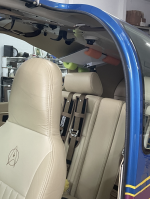
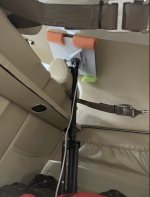
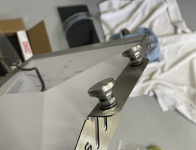
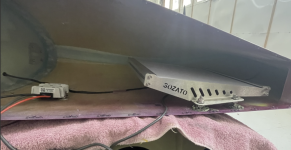
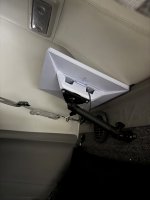
The mount arm and brackets come from a company in Dallas called 67 designs in their Ball2Ball series. It's mounted to the aft bulkhead at the centerline on the vertical support. The bulkhead received an additional mount screw to the support just below the bracket. The antenna sits on and is partially supported by the stiffening ridge on the upper bulkhead cover. If the ball screws should loosen over time the antenna will swing down into the baggage area. This would be obvious and, due to the generous length of the screws, would happen well before the arm disassembles. This should ensure it doesn't become a missle into the back of your head in turbulence (or worse). Might add a safety lanyard as well.

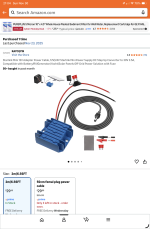
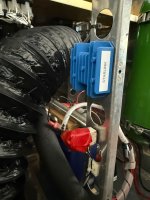
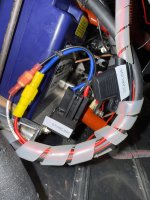
Power and control are mounted on the battery tray (relay), vertical support arm (DC step- up converter and power cable) and instrument panel (on/off switch to relay).

Having internet inflight is a true game-changer for those who engage in long flights. The weather products available far surpass and compliment XM and ADS-B (if they are available). Weather cams, forest fires and satellite cloud cover views to name a few. I've used internet phone calls to listen to AWOS or D-ATIS way before my radio could pick it up. Call the FBO for arrival coordination. If your cruising and have a beautiful view, share it with others on a Facetime call. VFR and the weather turns bad?... File an IFR flightplan in seconds. I use ForeFlight and can build, file and receive in less than a minute. I can't even find the right FSS frequency to use that fast much less call and recite all the necessary data.

The only limitation is your imagination so let me know of crafty uses you come up with.
IMG_2674.jpegIMG_1275.jpegIMG_1276.jpegIMG_1277.jpegIMG_1274.pngIMG_2672.jpegIMG_1273.pngIMG_2671.jpeg
 
Thanks for sharing! It also seems that powering Starlink Mini directly with 12-14V is possible as long as you use a short enough power cable so there isn't much voltage drop. I'm curious if you had looked into that option or not?

We have a Starlink in our RV10 now temporarily using a 12V socket and it has been quite nice!
 
This mount for a Starlink Mini antenna works great in a RV-10 (without carbon fiber overhead)
Objectives:
Nice. What’s the total weight of this set up? Why “ without carbon fiber overhead” ? Does the overhead interfere with with transmit / receiving the satellite signal or is it a physical conflict?
 
Nice. What’s the total weight of this set up? Why “ without carbon fiber overhead” ? Does the overhead interfere with with transmit / receiving the satellite signal or is it a physical conflict?
The Carbon fiber Aerosport overhead console blocks the signal. I tested this with my Starlink antenna. It does work if you can put it on a angle on one side of the carbon fiber though. I decided to mount it in the wingtip.
 
Do you have any antennae up top? I have a COM/XM/GPS antenna aft of the bag wall in the tailcone and it doesn't seem to like my XM in that area.
 
Nice. What’s the total weight of this set up? Why “ without carbon fiber overhead” ? Does the overhead interfere with with transmit / receiving the satellite signal or is it a physical conflict?
Works fine mounted like this. There was a post 4 or 5 months ago that said he positioned his under the overhead console and it worked! I did not attempt this as I thought would have zero chance. 6 ft of 16 awg into my main bus that operates at 14.0 volts, no issues.

Screenshot 2025-12-11 144830.pngScreenshot 2025-12-11 144758.png
 
Thanks for sharing! It also seems that powering Starlink Mini directly with 12-14V is possible as long as you use a short enough power cable so there isn't much voltage drop. I'm curious if you had looked into that option or not?

We have a Starlink in our RV10 now temporarily using a 12V socket and it has been quite nice!
Yes, I considered it but..... As you say, the cable needs to ensure low voltage drop plus, I needed a power cable either way and for the $29 price the boost to steady 30v seemed a reasonable way to go. I know Starlink says it will work with 12 - 40V, but it really 'likes' 30 so why not.
 
Nice. What’s the total weight of this set up? Why “ without carbon fiber overhead” ? Does the overhead interfere with with transmit / receiving the satellite signal or is it a physical conflict?
Starlink antenna is 2.5#, mount less than a pound, power supply and wires maybe 1# so.... Less than 5#.
 
Nice. What’s the total weight of this set up? Why “ without carbon fiber overhead” ? Does the overhead interfere with with transmit / receiving the satellite signal or is it a physical conflict?
Antenna can see through fiberglass but not carbon fiber or aluminum.
 
Do you have any antennae up top? I have a COM/XM/GPS antenna aft of the bag wall in the tailcone and it doesn't seem to like my XM in that area.
I have a GA35 (gps) antenna on the aluminum tailcone top right behind the baggage bulkhead. So far no interference but that's why I installed the relay and switch. On a GPS approach in IMC it will be turned off to avoid any possibility of interference.
 
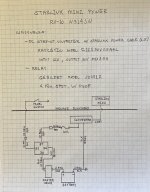
One way to wire it... With an updated drawing
 

Attachments

  • IMG_1292.jpeg
    IMG_1292.jpeg
    3 MB · Views: 119
Last edited:
One way to wire it...
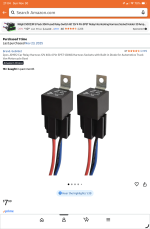
Does orientation on pins 85 and 86 on the relay matter? Electrical rookie asking. Parts in-hand and ready to start install. Grok gives this answer which is the same as the diagram in the product listing on amazon for the JD1912 relay:

Built-in Diode (Common in JD1912 Models)
• Many JD1912 relays (especially those in harness kits on Amazon/eBay) include an internal diode for spike protection.
• In this case, polarity matters:
• Connect +12V to pin 86 (cathode side of the diode).
• Connect ground to pin 85 (anode side).
• Reversing them causes the diode to conduct continuously, bypassing the coil → the relay won’t activate (or may cause a short/fuse blow).
• The suppression loses effectiveness if reversed.
 
Does orientation on pins 85 and 86 on the relay matter? Electrical rookie asking. Parts in-hand and ready to start install. Grok gives this answer which is the same as the diagram in the product listing on amazon for the JD1912 relay:

Built-in Diode (Common in JD1912 Models)
• Many JD1912 relays (especially those in harness kits on Amazon/eBay) include an internal diode for spike protection.
• In this case, polarity matters:
• Connect +12V to pin 86 (cathode side of the diode).
• Connect ground to pin 85 (anode side).
• Reversing them causes the diode to conduct continuously, bypassing the coil → the relay won’t activate (or may cause a short/fuse blow).
• The suppression loses effectiveness if reversed.
Good catch.
85 goes to switch...86 to +12v
 
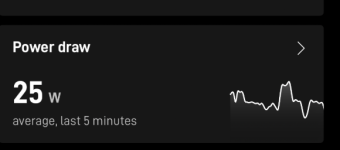
Question: I assume you used the relay to avoid putting the full Starlink current through your switch. It looks like the Starlink Mini has a max consumption of 60W and a normal consumption of about 30W. That's 5A and 2.5A at 12V (although I'm not sure how much overhead is added by the 30V power converter?). Did you consider just wiring the switch directly to the 30V converter?

I ask because I'm using the Aerosport switches and they are rated for 20A at 12V and I was going to put my pitot heat directly through the switch. Should I be concerned about that? Would anybody be concerned about putting max 5A for Starlink through an Aerosport switch? One difference is Pitot Heat is rarely used (for me at least) but Starlink will probably almost always be turned on.
 
Question: I assume you used the relay to avoid putting the full Starlink current through your switch. It looks like the Starlink Mini has a max consumption of 60W and a normal consumption of about 30W. That's 5A and 2.5A at 12V (although I'm not sure how much overhead is added by the 30V power converter?). Did you consider just wiring the switch directly to the 30V converter?

I ask because I'm using the Aerosport switches and they are rated for 20A at 12V and I was going to put my pitot heat directly through the switch. Should I be concerned about that? Would anybody be concerned about putting max 5A for Starlink through an Aerosport switch? One difference is Pitot Heat is rarely used (for me at least) but Starlink will probably almost always be turned on.
I’m looking to do exactly the same. I can’t see an issue, but I’ll be standing by for any responses that might convince me otherwise.
 
Question: I assume you used the relay to avoid putting the full Starlink current through your switch. It looks like the Starlink Mini has a max consumption of 60W and a normal consumption of about 30W. That's 5A and 2.5A at 12V (although I'm not sure how much overhead is added by the 30V power converter?). Did you consider just wiring the switch directly to the 30V converter?

I ask because I'm using the Aerosport switches and they are rated for 20A at 12V and I was going to put my pitot heat directly through the switch. Should I be concerned about that? Would anybody be concerned about putting max 5A for Starlink through an Aerosport switch? One difference is Pitot Heat is rarely used (for me at least) but Starlink will probably almost always be turned on.
I’m running mine through a relay too. (Pitot heat as well)
I don’t have any high current switches on the panel. I had a cabin full of smoke from a properly rated good quality pitot heat toggle switch that went south in my last RV
 
Question: I assume you used the relay to avoid putting the full Starlink current through your switch. It looks like the Starlink Mini has a max consumption of 60W and a normal consumption of about 30W. That's 5A and 2.5A at 12V (although I'm not sure how much overhead is added by the 30V power converter?). Did you consider just wiring the switch directly to the 30V converter?

I ask because I'm using the Aerosport switches and they are rated for 20A at 12V and I was going to put my pitot heat directly through the switch. Should I be concerned about that? Would anybody be concerned about putting max 5A for Starlink through an Aerosport switch? One difference is Pitot Heat is rarely used (for me at least) but Starlink will probably almost always be turned on.
I'm using a micro switch (my name) for Starlink. Don't like a cluttered panel and this isn't a primary system. It's hidden away out of sight. Besides, I'm getting my power directly from the primary relay in the back and I didn't want to run #18 wire all the way up front and back. Much easier to run one #22 wire to the switch then ground.

About your switches. You shouldn't use more than 80% capacity of the switch continuously. Be sure to consider startup or inrush current of the load being controlled. Could be 1.5 - 2.5 times steady state for a pump.

I personally kept high loads off of the panel by using relays for fuel pump and pitot heat (and now Starlink because of the small switch).
 
This mount for a Starlink Mini antenna works great in a RV-10 (without carbon fiber overhead)
Objectives:
1. Position works
2. Easily hardwired for power and control (on/off)
3. Easily removed (both antenna and mount)
4. Not a hazard to occupants during turbulence
5. Not in the way of normal activity
6. Minimal exposed wires and attachment hardware

The mount arm and brackets come from a company in Dallas called 67 designs in their Ball2Ball series. It's mounted to the aft bulkhead at the centerline on the vertical support. The bulkhead received an additional mount screw to the support just below the bracket. The antenna sits on and is partially supported by the stiffening ridge on the upper bulkhead cover. If the ball screws should loosen over time the antenna will swing down into the baggage area. This would be obvious and, due to the generous length of the screws, would happen well before the arm disassembles. This should ensure it doesn't become a missle into the back of your head in turbulence (or worse). Might add a safety lanyard as well.

Power and control are mounted on the battery tray (relay), vertical support arm (DC step- up converter and power cable) and instrument panel (on/off switch to relay).

Having internet inflight is a true game-changer for those who engage in long flights. The weather products available far surpass and compliment XM and ADS-B (if they are available). Weather cams, forest fires and satellite cloud cover views to name a few. I've used internet phone calls to listen to AWOS or D-ATIS way before my radio could pick it up. Call the FBO for arrival coordination. If your cruising and have a beautiful view, share it with others on a Facetime call. VFR and the weather turns bad?... File an IFR flightplan in seconds. I use ForeFlight and can build, file and receive in less than a minute. I can't even find the right FSS frequency to use that fast much less call and recite all the necessary data.

The only limitation is your imagination so let me know of crafty uses you come up with.

View attachment 104438View attachment 104439View attachment 104440View attachment 104441View attachment 104442View attachment 104443View attachment 104444View attachment 104445
 
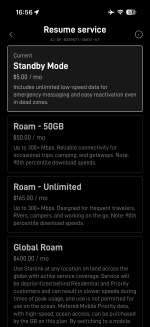
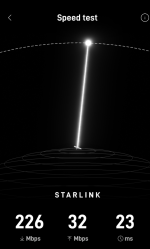
I recently changed my subscription level to 'STANDBY MODE'. This is the $5/month plan which gives unlimited low speed data for emergency messaging and reactivation. Testing in this mode shows that most weather products are still available with a little trouble with the weather cameras. All texting and phone seemed normal with no delay. Even got Facetime to work. It seems that if you keep your downloads to one app with simple data, this cost effective plan gives you a lot of capability. You get a bit less than 1 Mbps download vs ~ 30-90 Mbps with the Roam 50 plan. Good for local flying but you'll probably want to change back to Roam 50 for longer trips.

Also learned that the off switch was a good idea. Chat says that Starlink should not cause any interference with GPS or VHF (I haven't noticed any either) but will interfere with the connection your phone makes with an Insta 360 camera. Solution is get the inexpensive remote for the camera and forego reviewing recordings and controlling the camera on the phone.

p.s. I love being able to call ASOS when out of radio range. Also listened in to local tower on LiveATC when 100 out. Having the extra weather products is really nice on a long trip.
 

Attachments

  • IMG_2771.png
    IMG_2771.png
    270.4 KB · Views: 24
The Carbon fiber Aerosport overhead console blocks the signal. I tested this with my Starlink antenna. It does work if you can put it on an angle on one side of the carbon fiber though. I decided to mount it in the wingtip.
Please send photos and pertinent info when you get it mounted in your wingtip.
 
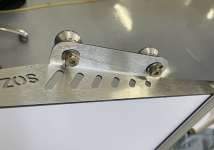
Finally pulled the trigger on mounting the Star Link antenna. It had been temporarily mounted rear baggage starboard side next to the AeroSport overhead. Worked well and picks attached above. Since I have the Showplanes composite tailcone was going to mount it there and the 10 could always use the added weight for CG enhancement but decided that access and mounting issues decided the wing tip was best. I used an already purchased frame mount and hardware and epoxied in place. (Click Bond adhesive and third-party studs) If I did not already have the hardware, I think Richard's idea using foam would be better. Also used Traash's step-up power converter that worked well.


Screenshot 2026-01-11 092046.pngScreenshot 2026-01-11 092031.pngScreenshot 2026-01-11 092013.png

Screenshot 2026-01-11 092000.pngScreenshot 2026-01-11 091938.png
 
Finally pulled the trigger on mounting the Star Link antenna. It had been temporarily mounted rear baggage starboard side next to the AeroSport overhead. Worked well and picks attached above. Since I have the Showplanes composite tailcone was going to mount it there and the 10 could always use the added weight for CG enhancement but decided that access and mounting issues decided the wing tip was best. I used an already purchased frame mount and hardware and epoxied in place. (Click Bond adhesive and third-party studs) If I did not already have the hardware, I think Richard's idea using foam would be better. Also used Traash's step-up power converter that worked well.


View attachment 106992View attachment 106993View attachment 106994

View attachment 106995View attachment 106996
I’m curious how you chose the exact location within the wing tip What were the considerations?
 
I’m curious how you chose the exact location within the wing tip What were the considerations?
Wanted to move it back away from the main cluster of lights (I have Aveo Vegas Zip Tips) and not to close to the less rear cluster of lights and outside as much as possible to help with possible shadowing. I did test it in that location on the ground before I finalized the location. Not very scientific.
 
Can the starlink go in the same wingtip as one of the archer vor antennas or does it cause interference in that frequency range?
 
Can the starlink go in the same wingtip as one of the archer vor antennas or does it cause interference in that frequency range?

Mine is in the same tip. I have only shot an ILS once since installing the Starlink. It was in IMC so I made sure the antenna was switched off just to be sure. One of these days I’ll test it turned on in VMC
 
I switched to the ridiculously cheap Standby Mode plan ($ 5.00 a month) and now music, voice and even ForeFlight reception is marginal at best. Is the Standby mode plan working for others? I might have fallen into the penny wise and dollar foolish economics. Or Starlink has figured out how to reduce my service.
 
I switched to the ridiculously cheap Standby Mode plan ($ 5.00 a month) and now music, voice and even ForeFlight reception is marginal at best. Is the Standby mode plan working for others? I might have fallen into the penny wise and dollar foolish economics. Or Starlink has figured out how to reduce my service.
Good news…unlimited data,
Bad news…very low speed
Good news…can easily upgrade plan to get high speed at any time.

Think old dial-up internet. Seems to work for normal inflight needs (not streaming) if you limit active apps to one at a time.
 
Good news…unlimited data,
Bad news…very low speed
Good news…can easily upgrade plan to get high speed at any time.

Think old dial-up internet. Seems to work for normal inflight needs (not streaming) if you limit active apps to one at a time.
So, no issues upgrading for a day or two and then going back to the el-cheapo plan?
 
Just got this ☹️

Update on Operating Speed Limits

Your Starlink has recently been detected operating at high speeds. Your plan is intended for in-motion use on land or in water, such as driving and boating.
Impacted Service Lines:
Effective immediately, the maximum supported in-motion speed for Roam and Priority plans is 100 mph (160 km/h, 87 knots).
We know many customers rely on Starlink in fast moving vehicles and in remote environments, and we want to make sure you have the right plan to stay connected.
Starlink has designed two new plans that may better suit your needs: Aviation 300MPH and 450MPH.


Aviation 300MPH

  • $250 USD base monthly subscription
  • 20GB of data included each month
  • In-motion use supported up to 300 mph (482 km/h)
  • Optional overage data available at $10 USD per GB

Aviation 450MPH

  • $1,000 USD base monthly subscription
  • 20GB of data included each month
  • In-motion use supported up to 450 mph (724 km/h)
  • Optional overage data available at $50 USD per GB
Identity verification is required for both plans and includes submission of a valid passport and aircraft tail number.
To express interest in switching to either Aviation 300MPH or Aviation 450MPH and begin the verification process, please click the button below to create a support ticket and reference the applicable plan.

[td]
[/td]
Visit our FAQs to learn more.

Your Options

  • Stay on your current plan and continue using Starlink at speeds up to 100 mph (160 km/h)
  • Create a ticket about switching to an Aviation plan
Thank you for choosing Starlink.
 
  • $1,000 USD base monthly subscription
  • 20GB of data included each month
  • In-motion use supported up to 450 mph (724 km/h)
  • Optional overage data available at $50 USD per GB
Identity verification is required for both plans and includes submission of a valid passport and aircraft tail number.
To express interest in switching to either Aviation 300MPH or Aviation 450MPH and begin the verification process, please click the button below
  • Stay on your current plan and continue using Starlink at speeds up to 100 mph (160 km/h)
  • Create a ticket about switching to an Aviation plan
Thank you for choosing Starlink.
Yep. That does it - was nice while it lasted. Back to XM weather. Too bad. I fear we are too small a group for them to notice the wave of cancellations.
 
Last edited:
Thanks for sharing! It also seems that powering Starlink Mini directly with 12-14V is possible as long as you use a short enough power cable so there isn't much voltage drop. I'm curious if you had looked into that option or not?

We have a Starlink in our RV10 now temporarily using a 12V socket and it has been quite nice!
Starlink has a car adaptor kit that comes with a 12v cigarette style plug to USB C adaptor to power the dish. The cord in the kit is 10 feet long. I have been using it on a boat with zero issues.
 
Just got this ☹️

Update on Operating Speed Limits

Your Starlink has recently been detected operating at high speeds. Your plan is intended for in-motion use on land or in water, such as driving and boating.
Impacted Service Lines:
Effective immediately, the maximum supported in-motion speed for Roam and Priority plans is 100 mph (160 km/h, 87 knots).
We know many customers rely on Starlink in fast moving vehicles and in remote environments, and we want to make sure you have the right plan to stay connected.
Starlink has designed two new plans that may better suit your needs: Aviation 300MPH and 450MPH.


Aviation 300MPH

  • $250 USD base monthly subscription
  • 20GB of data included each month
  • In-motion use supported up to 300 mph (482 km/h)
  • Optional overage data available at $10 USD per GB

Aviation 450MPH


  • $1,000 USD base monthly subscription
  • 20GB of data included each month
  • In-motion use supported up to 450 mph (724 km/h)
  • Optional overage data available at $50 USD per GB
Identity verification is required for both plans and includes submission of a valid passport and aircraft tail number.
To express interest in switching to either Aviation 300MPH or Aviation 450MPH and begin the verification process, please click the button below to create a support ticket and reference the applicable plan.

Well that kills my starlink plans for a Rocket trip.
[td]
Create Ticket


[/td]

Visit our FAQs to learn more.

Your Options


  • Stay on your current plan and continue using Starlink at speeds up to 100 mph (160 km/h)
  • Create a ticket about switching to an Aviation plan
Thank you for choosing Starlink.
 
What a bummer, I just finished my install and did one trip with it. I am not willing to pay $250/month for it.
 
Oh well I guess I’ll order the ADSB in receiver instead.

I read a few months ago that Amazon and T-Mobile are hard at work developing a competing product. In my area, 5g works almost to 5000’. I imagine it won’t be long before we have tons of options. Amazons antenna is supposedly paperback book size.
 
Back
Top