
Yeesh. I had to pay 10% on some avionics from Canada and thought that was a lot...Trump Tarif: 336.76

Van's Air Force
You are using an out of date browser. It may not display this or other websites correctly.
You should upgrade or use an alternative browser.
You should upgrade or use an alternative browser.
Displaying thermal image on Garmin G3X. What IR/thermal video camera?
- Thread starter rockyfatcat
- Start date

NORDO Industries LLC
Well Known Member
I didn't even think of transmitting the video wirelessly – great idea. Any idea what the power draw for the module is like? Having a module that can be just clamped to a tie-down eyelet would solve a ton of mounting problems.

To the people following this thread here is a status update.
I managed to develop a low power bluetooth application for IoS to communicate with a small arduino that talks to the Axisflying camera.
On the tip of my wing, I installed the thermal camera, on the landing light lens, the arduino and a video transmitter. all getting power from a tap on NAV lights. pictures below.
The video transmitter sends the video signal to the video receiver installed in the cockpit on the back of the MFD (passenger G3X). The video receiver is then connected through coax cables to PFD and MFD.
From the cockpit I can use my phone or iPad to adjust camera parameters such as color palete, contrast, bright, etc...
The prototype is working great at daylight and at night. I forgot to take pictures airborne. They look much nicer and more defined as the field of view is narrow.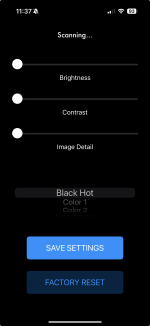
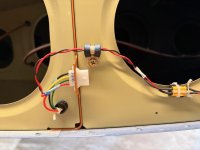
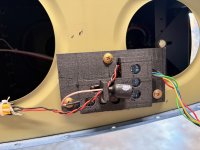
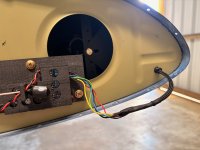
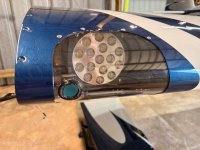
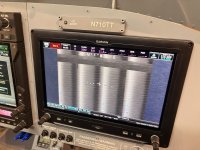
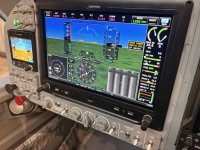
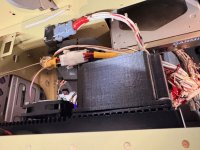
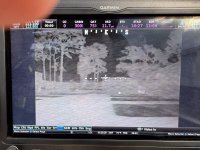
I managed to develop a low power bluetooth application for IoS to communicate with a small arduino that talks to the Axisflying camera.
On the tip of my wing, I installed the thermal camera, on the landing light lens, the arduino and a video transmitter. all getting power from a tap on NAV lights. pictures below.
The video transmitter sends the video signal to the video receiver installed in the cockpit on the back of the MFD (passenger G3X). The video receiver is then connected through coax cables to PFD and MFD.
From the cockpit I can use my phone or iPad to adjust camera parameters such as color palete, contrast, bright, etc...
The prototype is working great at daylight and at night. I forgot to take pictures airborne. They look much nicer and more defined as the field of view is narrow.
To the people following this thread here is a status update.
I managed to develop a low power bluetooth application for IoS to communicate with a small arduino that talks to the Axisflying camera.
On the tip of my wing, I installed the thermal camera, on the landing light lens, the arduino and a video transmitter. all getting power from a tap on NAV lights. pictures below.
The video transmitter sends the video signal to the video receiver installed in the cockpit on the back of the MFD (passenger G3X). The video receiver is then connected through coax cables to PFD and MFD.
From the cockpit I can use my phone or iPad to adjust camera parameters such as color palete, contrast, bright, etc...
View attachment 103674
I think you’re in the wrong place, this is a home built plane forum, not a space shuttle forum.
Looks great, I’m impressed with how good these Chinese thermal cameras are, Flir no longer own the market for small sensors that’s for sure.
Nice idea to use fpv gear to transmit the video. Really interested to see the results from flight testing.
Amazing! Congrats!To the people following this thread here is a status update.
I managed to develop a low power bluetooth application for IoS to communicate with a small arduino that talks to the Axisflying camera.
On the tip of my wing, I installed the thermal camera, on the landing light lens, the arduino and a video transmitter. all getting power from a tap on NAV lights. pictures below.
The video transmitter sends the video signal to the video receiver installed in the cockpit on the back of the MFD (passenger G3X). The video receiver is then connected through coax cables to PFD and MFD.
From the cockpit I can use my phone or iPad to adjust camera parameters such as color palete, contrast, bright, etc...
The prototype is working great at daylight and at night. I forgot to take pictures airborne. They look much nicer and more defined as the field of view is narrow.
How much does the landing light effect the cam?
A short in flight video would be nice..
I will make a short video next time.Amazing! Congrats!
How much does the landing light effect the cam?
A short in flight video would be nice..

Landing light has zero effect on the thermal camera. I installed the camera through the landing light lenses so there is no reflection of landing light towards the thermal camera
Here is the link to a video showing the camera working. I recorded the video at night with a GoPro so the resolution is not great.. but it is good enough.
The thermal camera shows many details on the ground that are not actually visible from the cockpit. lakes and clouds and tress specially. Also some roads.
The thermal camera shows many details on the ground that are not actually visible from the cockpit. lakes and clouds and tress specially. Also some roads.
Very nice! Thanks for pioneering the project!Here is the link to a video showing the camera working. I recorded the video at night with a GoPro so the resolution is not great.. but it is good enough.
The thermal camera shows many details on the ground that are not actually visible from the cockpit. lakes and clouds and tress specially. Also some roads.
Do you think it would work ok at night with the default settings only?
I'm thinking about a simplified version with the video transmitter/reciver only; skipping the BT interface.
Any particular reason for mounting it in the landing light lens vs wing tip?
Did you use any additional glass protection in front of the camera lens? (for easier maintenance - cleaning of dirt/bugs etc.) EDIT: disregard, I noticed that you mentioned 'nothing in front of the cam lens' in your previous post.
-what's the total amps draw?
Last edited:
The default settings aren’t great. He developed the iPhone app to give him full authority over full range of camera settings. The camera technology requires a germanium lens to see through. Any plastic or glass will prevent it from working. He cut a window in the lens and mounted the camera behind the germanium lens for it to workVery nice! Thanks for pioneering the project!
Do you think it would work ok at night with the default settings only?
I'm thinking about a simplified version with the video transmitter/reciver only; skipping the BT interface.
Any particular reason for mounting it in the landing light lens vs wing tip?
Did you use any additional glass protection in front of the camera lens? (for easier maintenance - cleaning of dirt/bugs etc.) EDIT: disregard, I noticed that you mentioned 'nothing in front of the cam lens' in your previous post.
-what's the total amps draw?
I anticipate that he will soon be selling the app as a much more affordable option to the aviation community
Last edited:

Pretty exciting! I tested a FLIR from GRT more than a dozen years ago - it worked on the GRT EFIS, and had an awesome carbon-fiber under-wing mount. Cost was something like $18K, and while it did everything it was supposed to, it really was more of a “thing of interest” than an actual usable tool. What I said at the time is that if you did a huge amount of night flying, and you were worried about where you would set down in case of an engine failure, it added a little bit of margin. Otherwise….its still really cool, and you’ve done a great job of interfacing it to the Garmin!
The most expensive item is the camera. The other components are not expensive.The default settings aren’t great. He developed the iPhone app to give him full authority over full range of camera settings. The camera technology requires a germanium lens to see through. Any plastic or glass will prevent it from working. He cut a window in the lens and mounted the camera behind the germanium lens for it to work
I anticipate that he will soon be selling the app as a much more affordable option to the aviation community
I chose to drill the landing light cover instead of the wing tip because if the outcome wasn’t good I could easily replace the lens and call it off…
I am not sure there is a market for this but if we gather a group of interested builders I could build a batch and sell them for low price.
Unfortunately Apple charges an annual fee to have the app on their store. Even if the app is free. So I would have to charge that too.
The camera bracket is 3d printed and It has space to install a germanium window.
the y stem can be either wired or wireless.
Let me know if you guys are interessante and, according to the demand, I can work on a price estimate.
Regarding default settings, it is doable. But I like the crispier image and a bit more contrast.
I don’t show on the video but there are many color palettes. Not only black and white.
Very cool little camera!
Sign me up! You more than I ever will about apps. Is there a way to send and install an app without using the App Store?The most expensive item is the camera. The other components are not expensive.
I chose to drill the landing light cover instead of the wing tip because if the outcome wasn’t good I could easily replace the lens and call it off…
I am not sure there is a market for this but if we gather a group of interested builders I could build a batch and sell them for low price.
Unfortunately Apple charges an annual fee to have the app on their store. Even if the app is free. So I would have to charge that too.
The camera bracket is 3d printed and It has space to install a germanium window.
the y stem can be either wired or wireless.
Let me know if you guys are interessante and, according to the demand, I can work on a price estimate.
Regarding default settings, it is doable. But I like the crispier image and a bit more contrast.
I don’t show on the video but there are many color palettes. Not only black and white.
Very cool little camera!

I'm interested.The most expensive item is the camera. The other components are not expensive.
I chose to drill the landing light cover instead of the wing tip because if the outcome wasn’t good I could easily replace the lens and call it off…
I am not sure there is a market for this but if we gather a group of interested builders I could build a batch and sell them for low price.
Unfortunately Apple charges an annual fee to have the app on their store. Even if the app is free. So I would have to charge that too.
The camera bracket is 3d printed and It has space to install a germanium window.
the y stem can be either wired or wireless.
Let me know if you guys are interessante and, according to the demand, I can work on a price estimate.
Regarding default settings, it is doable. But I like the crispier image and a bit more contrast.
I don’t show on the video but there are many color palettes. Not only black and white.
Very cool little camera!
The only way is using a MacBook connected to the phone or iPad that will receive the application…Sign me up! You more than I ever will about apps. Is there a way to send and install an app without using the App Store?
The Apple Store fee is not prohibitive. If we gather a few people the cost dilutes well
Another option is to ship my iPad to you and let you load the app and ship it back.The only way is using a MacBook connected to the phone or iPad that will receive the application…
The Apple Store fee is not prohibitive. If we gather a few people the cost dilutes well
Think outside the box
Yes, that is an option too.Another option is to ship my iPad to you and let you load the app and ship it back.
Think outside the box
I have done one controller version in the past that allowed to configure the camera via web browser and wifi connection. That could be an option for android users. The other option would be to install the controller application on a friends phone and do the adjustment once in a while.I'm running on android, so my plan is either to hard wire (coax) or use the video transmitter with the cam at default settings..
Interested in the kit (hardware) without the app. (germanium glass, video transmitter/receiver)
Thanks
These are my estimates for 3 kit options with and without the thermal camera:
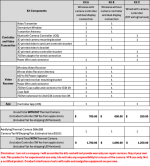
PM if interested. I need at least 5 orders for this to make financial sense to me. I will only fulfill orders and ask for payment once the group is formed and I am ready to order parts for the batch production.
Have a nice day!
PM if interested. I need at least 5 orders for this to make financial sense to me. I will only fulfill orders and ask for payment once the group is formed and I am ready to order parts for the batch production.
Have a nice day!
The Trump Tariff may have come down due to the agreements negotiated with China and signed in early November. According to Grok, if the camera can be classified under HTS Code 8525.80.4000, the tariff would be 17.5% on the total dutiable value of $579, or $101.33.camera: 529
shipping: 50
Trump Tarif: 336.76 (proudly paid, making America great again lol)
Don't understand why Kit C doesn't require the germanium window.
And my compliments on a very impressive project.
That might be a fact. That is whyI put the option of the Kits without the cameras. People can buy the camera directly. I would actually prefer that so I dont need to put a lot of money for cameras upfront..The Trump Tariff may have come down due to the agreements negotiated with China and signed in early November. According to Grok, if the camera can be classified under HTS Code 8525.80.4000, the tariff would be 17.5% on the total dutiable value of $579, or $101.33.
Don't understand why Kit C doesn't require the germanium window.
And my compliments on a very impressive project.
The Kit C is the controller stand alone. For people who want to DIY the camera part.
