Van's Air Force

The definitive Van's Aircraft support community! Buying, building or flying an RV? Join our exclusive family of mentors and enthusiasts!

FALSE "TRAFFIC" ALERTS IN DFW AREA?

chrispratt

Well Known Member
Sponsor
For the past couple of months I have been receiving false Traffic alerts from my Garmin GTX345 at least once every flight (had four alerts on a recent trip). The alert shows the traffic to be at "0" (my altitude) and my location. Of course, there's never anything there but I worry that I'll get numb to the alert someday when it's an actual threat.

I'm based at Aero Valley (52F) near Fort Worth, Texas. I asked Walt Aronow, our local Garmin expert, and he says he's been receiving reports of this from other local flyers but doesn't know the reason and doesn't think it's the Garmin equipment/software. Anyone else having this issue? Anyone know what might be causing it?

Curious if it's also happening outside the DFW area.

Chris
 
I had that happen a couple of weeks ago in a G1000 airplane about 40 miles east of ICT. It's happened to me 3-4 times in the last 10 years or so, always in G1000 planes, which is what I fly 90% of the time. I don't recall seeing it on my G3X yet.

I just assumed that it was seeing it's own shadow and getting confused.
 
The alert shows the traffic to be at "0" (my altitude) and my location.
I've been trying to find the answer to this for months now. It is a Garmin system error that has occurred since when I had my transponder and pitot system checks performed in late May. For me it began when the junior tech pulled the GSU 25 unit up and flipped it over despite not enough slack in the wire harness. I'm certain it is a broken wire or loose connection between the GSU 25 and the GTX 35R transponder.

Here is the thread. No solution. The avionics shop can't figure it out, Garmin can't figure it out and no solution found here. I just gave up and deal with it.

Start watching your XPDR box at top of G3X and when you see the "0" over your location you will also see XPDR change to a yellow "NO ADSB."
 
Last edited:
I've been trying to find the answer to this for months now. It is a Garmin system error that has occurred since when I had my transponder and pitot system checks performed in late May. For me it began when the junior tech pulled the GSU 25 unit up and flipped it over despite not enough slack in the wire harness. I'm certain it is a broken wire or loose connection between the GSU 25 and the GTX 35R transponder.

Here is the thread. No solution. The avionics shop can't figure it out, Garmin can't figure it out and no solution found here. I just gave up and deal with it.

Start watching your XPDR box at top of G3X and when you see the "0" over your location you will also see XPDR change to a yellow "NO ADSB."
I'll start watching the XPDR to see if the same happens on my GTX345. It was installed (by Walt) in 2017 and has had no problems. Thanks.
 
I had that happen a couple of weeks ago in a G1000 airplane about 40 miles east of ICT. It's happened to me 3-4 times in the last 10 years or so, always in G1000 planes, which is what I fly 90% of the time. I don't recall seeing it on my G3X yet.

I just assumed that it was seeing it's own shadow and getting confused.
Early on "seeing its own shadow" was a common problem with some software but I haven't seen much discussion of that recently. I'm wondering if all the Solar Cycle activity, or even the rare planet alignments we've seen lately might be having some impact, but that's beyond my science training to figure out.
 
I'll start watching the XPDR to see if the same happens on my GTX345. It was installed (by Walt) in 2017 and has had no problems. Thanks.
Nor did mine ever have the problem for four years. But once it starts it is next to impossible to track down the gremlin. Please let me know if you do find the fix and I will do the same.
 
I've seen this myself as well as a number of other folks from the area with G3X/GTX345/45 etc..
Mine has all the latest SW but some others have not updated things in a long while and have older SW but seeing the same issue, so pretty sure it not a 'new' Garmin SW issue as everybody says the same thing: no problems for years and all of a sudden ghost traffic is popping up.
(no other faults observed)
 
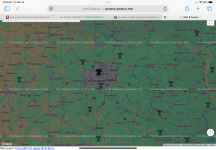
I have been seeing this in the DFW area for a while also, and several others have reported it to me also. My stack is all Dynon. It seemed to be more concentrated in the N/NW area of DFW, so I assumed it’s a faulty ADSB tower. They have been known to have bad software pushed out to the towers. It’s gotten better lately, so I also assumed some fix was implemented. It was happening a lot in August north of 52F, but I haven’t flown over there lately, mostly straight west, but it pops up sometimes still toward the north end of Eagle Mountain, so maybe something is still going on with a tower?
 
I see the same in my G3X / GDL39 equipped RV. The classic way to see my own "shadow" is to make a 360 degree steep turn.

I also see something else every now and then: actual traffic that doesn't exist. It'll show 3 or 4 airplanes at various altitudes and distances that just are not there. I know they're not because I was in Class C airspace and asked about it and was told there was nothing there. I'll have to get a picture of it next time it happens.

I've learned to take the traffic displays -- whether they're ADS-B, TIS, or even from a million-dollar TCAS system -- with a grain of salt.
 
Your adsb in sw has something called ownship. When it sees itself, it knows not to report it. It recognizes the hex code and knows its you. It also tracks this “you” target and if it all of a sudden shows as unidentified, but still in the exact same geographical space, it also doesn’t show it. Apparently it is common for your identifier details to disappear and then reappear, presumably from ground station issues. I watch my son take trips on flightaware and see the target go from rv6 or airbeetle to no indentifier and back again. Also see speed drop to zero and then back to normal.

When we do certain aggressive maneuvers in our 6 with grt, a new target pops up on top of us and then quickly goes away. I think the maneuver creates a separation from the targets and tricks the sw. I think every maker writes this sw a little differently and hard to pinpoint exactly what conditions cause it to happen. But believe it all stems from poor data packets sent from the grd. Have noticed this being MUCH worse in the last few months than it ever has been.
 
Last edited:
Well, count me in, too. I have a GTN650XI but didn't load the latest update. I am indeed getting 'ghost' targets at my location and altitude on my Skyview HDX, both today (low altitude trip to KXBP for 100LL) and higher altitude (to see the Aurora Borealis...cool!). Six targets tonight alone.
 
Last edited:
That is the safest way to fly. Way to many times I have eyes on traffic that’s not displayed, or intermittent traffic displayed that just disappears.

Look out the windows folks!
All true for sure BUT just last weekend there was a guy entering the pattern at the same time I was, not talking (later discovered he was on the wrong freq, I confess I did that myself once). Given the angles I might well never have seen him with the Mk I eyeball, but long before any problems I saw him on the iPad and I also got an audible warning via Bluetooth. Not a panacea, but it’s truly helpful technology. We’ll never know how much metal-to-metal contact it’s prevented!
 
I see the same in my G3X / GDL39 equipped RV. The classic way to see my own "shadow" is to make a 360 degree steep turn.
I see the same thing on my Dynon HDX system doing steep turn or turning with higher than normal G. I thought this issue only affects Dynon.
 
For the past couple of months I have been receiving false Traffic alerts from my Garmin GTX345 at least once every flight (had four alerts on a recent trip). The alert shows the traffic to be at "0" (my altitude) and my location. Of course, there's never anything there but I worry that I'll get numb to the alert someday when it's an actual threat.

I'm based at Aero Valley (52F) near Fort Worth, Texas. I asked Walt Aronow, our local Garmin expert, and he says he's been receiving reports of this from other local flyers but doesn't know the reason and doesn't think it's the Garmin equipment/software. Anyone else having this issue? Anyone know what might be causing it?

Curious if it's also happening outside the DFW area.

Chris
I often get a false ‘Bogie’ while flying my Garmin G3X. In RV8 Borrowed Horse,,,
I haven’t noticed getting false readings in The C180 or Shooter my Super Cub. Those two have Uvaionics ADSB out . The RV8 has something else, broadcasting ADSB.
 
Due to the ever increasing number of Extended Squitter (ES) users vs UAT, ground based uplink processing delays for ES is getting longer and not always agreeing with your in-cockpit air-to-air ES data, especially in high-density traffic areas. UAT is less susceptible now due it having fewer users than ES. And, more GA users are now installing and upgrading to ES ADS-B solutions. Originally, the FAA wanted GA users to install UAT and airliners to use ES, but this is no longer the case. However, I still use UAT with a Gamin GDL-82 and GDL-39 allowing me to continue to use my old Garmin GTX-320A. But, UAT only works in the US, which is one big drawback -- right. :unsure:

The ADS-B Services Reporting Site link below. They responded to me losing FIS-B weather information in the Seattle area last summer, and they got that fixed very quickly after I reported the issue!

 
Last edited:
…..Originally, the FAA wanted GA users to install UAT and airliners to use ES, but this is no longer the case. However, I still use UAT with a Gamin GDL-82 and GDL-39 allowing me to continue to use my old Garmin GTX-320A. But, UAT only works in the US, which is one big drawback -- right. :unsure:
IIRC the FAA mandated ES for the airlines (actually all aircraft above FL180) and assumed that cheapskate GA owners would all go for UAT. But they under estimated the cost of UAT especially for new aircraft which needed a new transponder too. And they knew it was politically unacceptable to mandate a GA solution that was more expensive than the airlines’.
 
I have been seeing this in the DFW area for a while also, and several others have reported it to me also. My stack is all Dynon. It seemed to be more concentrated in the N/NW area of DFW, so I assumed it’s a faulty ADSB tower. They have been known to have bad software pushed out to the towers. It’s gotten better lately, so I also assumed some fix was implemented. It was happening a lot in August north of 52F, but I haven’t flown over there lately, mostly straight west, but it pops up sometimes still toward the north end of Eagle Mountain, so maybe something is still going on with a tower?
That's an interesting observation. I wonder if it's a known issue to the FAA in charge of the ADS-B towers.
 
Your adsb in sw has something called ownship. When it sees itself, it knows not to report it. It recognizes the hex code and knows its you. It also tracks this “you” target and if it all of a sudden shows as unidentified, but still in the exact same geographical space, it also doesn’t show it. Apparently it is common for your identifier details to disappear and then reappear, presumably from ground station issues. I watch my son take trips on flightaware and see the target go from rv6 or airbeetle to no indentifier and back again. Also see speed drop to zero and then back to normal.

When we do certain aggressive maneuvers in our 6 with grt, a new target pops up on top of us and then quickly goes away. I think the maneuver creates a separation from the targets and tricks the sw. I think every maker writes this sw a little differently and hard to pinpoint exactly what conditions cause it to happen. But believe it all stems from poor data packets sent from the grd. Have noticed this being MUCH worse in the last few months than it ever has been.
Just FYI, I'm seeing the alerts during straight and level flights and not doing any maneuvers. To your point, however, I will get "Traffic not available" when doing some aerobatics, e.g. rolls, when the aircraft is inverted.
 
I'll start watching the XPDR to see if the same happens on my GTX345. It was installed (by Walt) in 2017 and has had no problems. Thanks.

With a UAT on 978mhz, even when coding properly that you can ADSB-IN both 1090ES and 978, this can happen as the FAA GBT rebroadcast catches up with you depending on SSR and GBT coverage. I think, layman's terms. 978 In only is MUCH worse for this.

It seems to get out of sync with your ADSB-IN ownship filtering. Someone terminology and tech savvy fix me, please. 1090ES likely suffers some of the same, or downstream ownship filtering can always get out of sync in either band.
 
Due to the ever increasing number of Extended Squitter (ES) users vs UAT, ground based uplink processing delays for ES is getting longer and not always agreeing with your in-cockpit air-to-air ES data, especially in high-density traffic areas. UAT is less susceptible now due it having fewer users than ES. And, more GA users are now installing and upgrading to ES ADS-B solutions. Originally, the FAA wanted GA users to install UAT and airliners to use ES, but this is no longer the case. However, I still use UAT with a Gamin GDL-82 and GDL-39 allowing me to continue to use my old Garmin GTX-320A. But, UAT only works in the US, which is one big drawback -- right. :unsure:

The ADS-B Services Reporting Site link below. They responded to me loosing FIS-B weather information in the Seattle area last summer, and they got that fixed very quickly after reported the issue!

Thank you. That's good information. I'll send a report.
 
That's an interesting observation. I wonder if it's a known issue to the FAA in charge of the ADS-B towers.
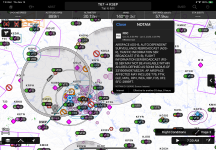
A couple posts above references a NOTAM for DFW, so I suppose they recognize the problem, but another report won't hurt. I read an article recently about real concerns about 1090 becoming way too saturated, so maybe we see it more in congested areas around Class B's?
 
A couple posts above references a NOTAM for DFW, so I suppose they recognize the problem, but another report won't hurt. I read an article recently about real concerns about 1090 becoming way too saturated, so maybe we see it more in congested areas around Class B's?
I sent a report to the address mentioned by RV-9erA https://www.faa.gov/air_traffic/technology/adsb/adsb_reports/. I certainly hope this issue is being addressed. I have become a big fan of ADS-B IN: it has pointed out a lot of traffic prior to coming in to visual range and helps me plan a course to avoid potential conflicts.
 
Regardless of whether you're looking out the windows or totally asleep, a false ADSB proximity warning will give you and your passengers a nasty surprise. We had it happen twice on a recent trip. "Warning! Traffic 11:00, less than one mile". Worse, when you don't see anything out there, you get really worried that you're missing the big bad that is coming for ya.

And what's it caused by? Probably some sort of issue with a ground station transmitting bad data, so it isn't filtered by your ADSB-in.
 
Just FYI, I'm seeing the alerts during straight and level flights and not doing any maneuvers. To your point, however, I will get "Traffic not available" when doing some aerobatics, e.g. rolls, when the aircraft is inverted.
Interesting. I keep thinking about those flights of my son that i observed with rhe changing speed, direction and indentifier. Makes me think that maybe they are having data integrity issues in FAA systems that pump out the tis data.
 
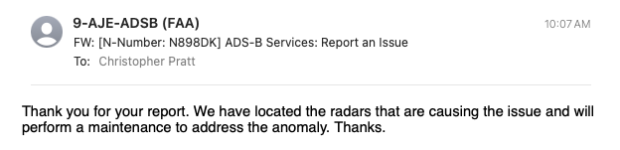
FAA responded to my report filing with the following:

Thank you for your report. We have located the radars that are causing the issue and will perform a maintenance to address the anomaly. Thanks.

Let's see if anything changes. I hope so.

Chris
 

Attachments

  • FAA False Traffic Alert report response.png
    FAA False Traffic Alert report response.png
    24.6 KB · Views: 16
Flew a fuel run from Aero Valley (52F) to Bridgeport (KXBP) and back this morning and had zero false traffic warnings. I hope this continues. Will let you know.

Chris
 
Back
Top