Van's Air Force

The definitive Van's Aircraft support community! Buying, building or flying an RV? Join our exclusive family of mentors and enthusiasts!

Starlink mini

glider_rider

Well Known Member
I’m thinking of adding a dedicated circuit to power the Starlink mini antenna on my RV10. I’d like to bolt it to the top of the baggage compartment.
I’m a bit confused about grounding the Starlink. Would it be OK to ground it locally in the back or should I run a ground wire to the front of the aircraft? What do you think?
 
I think you should be okay as long as you have a good low resistance ground on the grounding point you choose. Just have in mind that whatever power regulator you use, depending on its quality, it might introduce some noise in the plane ground. if you notice buzzing noise on audio, you might try to make a dedicated ground run.

My humble suggestion would be: Install everything in the place you want and, temporarily, make a long ground wire and test it grounding it to a local spot on baggage compartment and then, directly into your ground bus and see if you notice any audio noise.
 
I’m thinking of adding a dedicated circuit to power the Starlink mini antenna on my RV10. I’d like to bolt it to the top of the baggage compartment.
I’m a bit confused about grounding the Starlink. Would it be OK to ground it locally in the back or should I run a ground wire to the front of the aircraft? What do you think?
Are you intending to bolt it ON top of baggage compartment or TO the inside top of baggage compartment? I am interested to see pictures of the final installation and the results. Please post your pictures & results. Thanks, Ed S.
 
I’m thinking of adding a dedicated circuit to power the Starlink mini antenna on my RV10. I’d like to bolt it to the top of the baggage compartment.
I’m a bit confused about grounding the Starlink. Would it be OK to ground it locally in the back or should I run a ground wire to the front of the aircraft? What do you think?
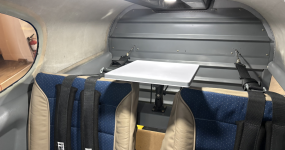
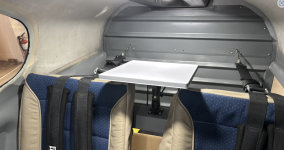
This is how a builder mounted his and he says worked well in spite of the fact it's mounted below a carbon graphite overhead console. I temporarily mounted mine rear baggage compartment next to the console at an angle and worked well. (Will eventually mount it in the tail cone since it's fiberglass)

I grounded mine locally and no issues.

Screenshot 2025-08-25 131928.png
 
Are you intending to bolt it ON top of baggage compartment or TO the inside top of baggage compartment? I am interested to see pictures of the final installation and the results. Please post your pictures & results. Thanks, Ed S.
My intention is to use this mount:
https://cad.onshape.com/documents/a...renderMode=0&uiState=68a89cf052428347635bb29b
I build a custom overhead console. Will place the hardware to which the mount will be bolted inside the console
Will post the pics when done
 
Just an FYI, I've noticed a 120hz pulse on the radio with the starlink powered up. This is with it running off of a separate battery, no connection to the plane. It's not a deal breaker, just annoying.
 
Just an FYI, I've noticed a 120hz pulse on the radio with the starlink powered up. This is with it running off of a separate battery, no connection to the plane. It's not a deal breaker, just annoying.
Thx, that’s what I was afraid of. It’s a relatively powerful transmitter
 
This is how a builder mounted his and he says worked well in spite of the fact it's mounted below a carbon graphite overhead console. I temporarily mounted mine rear baggage compartment next to the console at an angle and worked well. (Will eventually mount it in the tail cone since it's fiberglass)

I grounded mine locally and no issues.

View attachment 95908
Would be interesting to see if / to what degree the carbon fiber console blocks the satellite signal
 
Any reports on radio interference when installed in the wingtip? I know some people have tried out that installation location.
 
Mines in the wingtip with local grounding too. No issues related to power or noise.
Good, that's my plan right now. How did you get power into the wing? Did you just splice 12V into the official cable that came with the Starlink?

I'm putting my magnetometer in the tailcone and a VOR antenna in one wingtip so I was thinking the other wingtip would be perfect.
 
Good, that's my plan right now. How did you get power into the wing? Did you just splice 12V into the official cable that came with the Starlink?

I'm putting my magnetometer in the tailcone and a VOR antenna in one wingtip so I was thinking the other wingtip would be perfect.

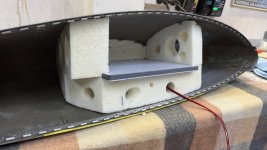
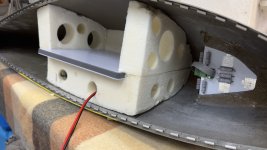
I got myself a DC5521plug with an AWG16 pigtail. Ran AWG16 back to the main bus via a relay and then put a switch on the panel to power it.
My LH wingtip has an archer nav antenna so I wanted to be able to shut it off.
I haven’t tested for nav frequency interference with it on yet.
The stock Starlink cable innards looks like it’s AWG22 or maybe even thinner but runs up to 48v. So it dosent work for long lengths at 14v. You could probably get away with a foot or so but I figured I needed to design for 70W even if it only ever seems to draw 25 or so.
 

Attachments

  • IMG_4715.jpeg
    IMG_4715.jpeg
    1.4 MB · Views: 289
  • IMG_4717.jpeg
    IMG_4717.jpeg
    1.3 MB · Views: 269
Good, that's my plan right now. How did you get power into the wing? Did you just splice 12V into the official cable that came with the Starlink?

I'm putting my magnetometer in the tailcone and a VOR antenna in one wingtip so I was thinking the other wingtip would be perfect.

I don’t recommend running starlink at or near its minimum of 12V. There are many reports of service drop outs at that voltage. Wire in a DC-DC step up converter like this one

https://www.amazon.com/Converter-EA...2cb47a0cf1d880fcf2&qid=1756265294&sr=8-8&th=1

to avoid this potential problem
 
Mines in the wingtip with local grounding too. No issues related to power or noise.
Hi Richard,

How's your wifi signal strength in the cockpit? I'm sure it's good enough else you wouldn't be using it, just curious if you're getting full strength?

Dave
 
I'm getting close to permanently mounting my Starlink antenna in my 10 after testing in the 10 and 14 for the last 5 months. I have a Garmin GDL 51R in the 10 and after looking at plans for weather and music appears the least monthly fee is ($30 for weather and $18 for music). Seems not like my cars as I can continue to receive promotional rates as long as I ask for it. It seems just going with Starlink for $60 a month gets one weather and music along with other features of the internet is the way to go? Also receiving changing TFR's through Foreflight more reliable than receiving TFR's through our Garmin equipment more reliable. Interesting in hearing from anyone using there Garmin 51 or 52 compared to wireless with Starlink. Thanks
 
I'm getting close to permanently mounting my Starlink antenna in my 10 after testing in the 10 and 14 for the last 5 months. I have a Garmin GDL 51R in the 10 and after looking at plans for weather and music appears the least monthly fee is ($30 for weather and $18 for music). Seems not like my cars as I can continue to receive promotional rates as long as I ask for it. It seems just going with Starlink for $60 a month gets one weather and music along with other features of the internet is the way to go? Also receiving changing TFR's through Foreflight more reliable than receiving TFR's through our Garmin equipment more reliable. Interesting in hearing from anyone using there Garmin 51 or 52 compared to wireless with Starlink. Thanks
Internet weather on Garmin Pilot via starlink is much more detailed than the ADSB weather, but the intensity scale is lower. (At least in the default setup.)
 
I got myself a DC5521plug with an AWG16 pigtail. Ran AWG16 back to the main bus via a relay and then put a switch on the panel to power it.
My LH wingtip has an archer nav antenna so I wanted to be able to shut it off.
I haven’t tested for nav frequency interference with it on yet.
The stock Starlink cable innards looks like it’s AWG22 or maybe even thinner but runs up to 48v. So it dosent work for long lengths at 14v. You could probably get away with a foot or so but I figured I needed to design for 70W even if it only ever seems to draw 25 or so.
Have you checked if the WiFi coverage will be good inside the canoppy, once the wingtip is installed back into position?
 
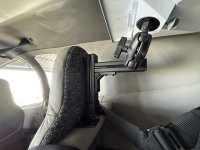
I can confirm that putting the Mini right up against the Aerosport carbon fiber overhead console in my 10 does not work. No reception at all. I would love to put it in the wingtip but don't know how hard it would be to get a wire through the wing in a finished plane. I'm going to try a Ram mount to my rear bulkhead panel then angle to the side and up in the baggage compartment. Also thinking about painting the back and sides so as to blend in with my headliner. Also, when I activated it I was able to go with the new $50 roam plan that has in motion speeds up to 450Kts
 
I can confirm that putting the Mini right up against the Aerosport carbon fiber overhead console in my 10 does not work. No reception at all. I would love to put it in the wingtip but don't know how hard it would be to get a wire through the wing in a finished plane. I'm going to try a Ram mount to my rear bulkhead panel then angle to the side and up in the baggage compartment. Also thinking about painting the back and sides so as to blend in with my headliner. Also, when I activated it I was able to go with the new $50 roam plan that has in motion speeds up to 450Kts
For sure it will not work up against the Aerosport carbon fiber console since trees seem to block the signal but a well known member (who seems very capable in avionics design) mounted his lower and says to works fine. Since the antenna seems to like 30–45-degree angles maybe this is why it works? My 10 is still in paint and have not tested it as yet although my plan was to mount it in the tailcone since I have a Showplanes composite tailcone.

Screenshot 2025-08-30 185657.png
 
Just an FYI, I've noticed a 120hz pulse on the radio with the starlink powered up. This is with it running off of a separate battery, no connection to the plane. It's not a deal breaker, just annoying.
Was it grounded also to the separate battery? So far, I have not had any radio pulsing in my 14 and that for me probably would be a deal breaker.
 
So I tested my Starlink that I put in my wingtip yesterday. It kept disconnecting. I had used an extra wire that was there for lights that had a 10 amp breaker it ran from so I thought it would be good but as others have mentioned, the wire run is too long for the 14.3v I tested it at. I was using an auxiliary power supply to up the voltage to my normal voltage when the engine is running. I decided to pump up the voltage for a brief moment to 15.5. When I did that, the Starlink worked fine. I will try this step up converter and see what happens. https://www.amazon.com/dp/B0DZNNTDS...=d2lkZ2V0TmFtZT1zcF9kZXRhaWxfdGhlbWF0aWM&th=1
 
For those of you having power problems with your Minis, have you tried turning off the snow melt function? From what I've read, the dish doesn't appear to have a dedicated heater or snow detector; it senses a blockage from reduced antenna performance, assumes the blockage is snow, and cranks up the power to generate additional heat to melt it.

Does a painted wingtip or RV-10 cockpit enclosure degrade Mini performance enough to trigger the snow melt function? I don't know, but it would be interesting to shut off the snow melt feature in the Starlink app and see if your current consumption goes down enough to minimize line loss. Somebody with a Mini, please check me on that function in the app.

Just curious...

Dave
 
Last edited:
For those of you having power problems with your Minis, have you tried turning off the snow melt function? From what I've read, the dish doesn't appear to have a dedicated heater or snow detector; it senses a blockage from reduced antenna performance, assumes the blockage is snow, and cranks up the power to generate additional heat to melt it.

Does a painted wingtip or RV-10 cockpit enclosure degrade Mini performance enough to trigger the snow melt function? I don't know, but it would be interesting to shut off the snow melt feature in the Starlink app and see if your current consumption goes down enough to minimize line loss. Somebody with a Mini, please check me on that function in the app.

Just curious...

Dave
So I just did your experiment. Set the snow melt to off, tried to run the Mini on my normal 14.3 volts. No joy. kept cutting out. Step up 1 more volt, runs fine. I'm sure it will be ok when I get my voltage step up adapter on Thursday. I will report back. This is a good explanation
 
Last edited:
I have a mini with the $65 plan mounted in the wingtip of my 9 - it works AWESOME!!!! Just flew out to Anacortes WA from Iowa - my wife was facetime video calling with my daughter for over an hour uninterrupted. I ended up just running a thick (I think 12-14 AWG) out to the tip to power. Locally grounded in the wingtip. I bought a boost buck just in case but so far I've had no issues - I think due to the heavy power wire I have running there - little to no voltage drop.
 
I’ve never seen mine use more than 25w or so in a metallic painted tip with OATs down to say -5c.
When I was experimenting early on with it in the cabin I worked out it needed a decent gauge wire to minimize voltage drop at the installed distance/volt/current.
16AWG out to the tip, locally grounded. No power issues.
 
So I just did your experiment. Set the snow melt to off, tried to run the Mini on my normal 14.3 volts. No joy. kept cutting out. Step up 1 more volt, runs fine. I'm sure it will be ok when I get my voltage step up adapter on Thursday. I will report back. This is a good explanation
Cool, thanks! It was worth a shot...

Dave
 
Currently using Local Priority Subscription for $40/month plus $25/month for 50GB which is enough. Anyone switch to the $ 50/month ROAM plan? I don't want to screw up a good thing especially with the TFR issues we have been having. Says ROAM gets access to "90th percentile download speeds" which sounds like enough.
 
So I just did your experiment. Set the snow melt to off, tried to run the Mini on my normal 14.3 volts. No joy. kept cutting out. Step up 1 more volt, runs fine. I'm sure it will be ok when I get my voltage step up adapter on Thursday. I will report back. This is a good explanation
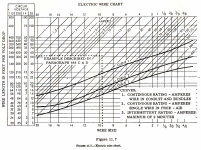
The Starlink cable provided seems not designed to start with 14.2 volts but 30 volts so no after the voltage drop will not end up over 12 volts. Use the voltage drop vs amp draw and awg. size that we all must use to determine if you will end up over 12 volts. Using the cable provided by Starlink with not work for our application. My 18 awg. wire seems to work fine with no dropouts.

Screenshot 2025-09-03 211744.png
 
Currently using Local Priority Subscription for $40/month plus $25/month for 50GB which is enough. Anyone switch to the $ 50/month ROAM plan? I don't want to screw up a good thing especially with the TFR issues we have been having. Says ROAM gets access to "90th percentile download speeds" which sounds like enough.
Unless something has changed and I don't believe it has. If you switch to ROAM you are capped to 100mph (won't work above that speed), where as the local priority is 250kts speed cap.
 
Unless something has changed and I don't believe it has. If you switch to ROAM you are capped to 100mph (won't work above that speed), where as the local priority is 250kts speed cap.
I think I read it is now capped at 550mph. I’m still several years away from needing it, but I’m following it with interest.
 
Local priority is 350, global is 550 (both mph). ROAM is 100 mph
It seems that there is conflicting info on this. Some say that they made a change recently. I have the 50 per month roam plan but I haven't flown with it yet. I will report back when I do.
 
It seems that there is conflicting info on this. Some say that they made a change recently. I have the 50 per month roam plan but I haven't flown with it yet. I will report back when I do.
Yeah I'm seeing some new info that the 50 plan may work at faster speeds. For now I'll stay with the 65 plan until it's solidly confirmed. Switching, depending on which way your are going, isn't always easy or timely.
 
I flew a cross country today and the Starlink (Local Priority Subscription) was flawless. I switched tonight to the Roam 50 GB plan, and it says might take up to 2 hours to change. It was an easy switch and if needed can switch back. Tomorrow I will take a short trip to test the new plan.
 
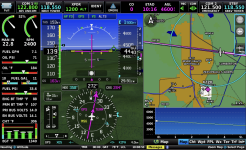
Roam -50GB plan worked well. Averaging 50 - 300 Mbps depending on direction flown. 25w average power draw with a range of 15w to 35w @ 14.2 volts according to my VPX. Mounted in baggage area of 14 with ~25-degree tilt.
 
Roam -50GB plan worked well. Averaging 50 - 300 Mbps depending on direction flown. 25w average power draw with a range of 15w to 35w @ 14.2 volts according to my VPX. Mounted in baggage area of 14 with ~25-degree tilt.
And what was your ground speed during the test? That is the limiter depending
 
And what was your ground speed during the test? That is the limiter depending
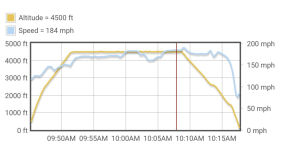
Well since the ground speed was limited to 100 mph before the change (as you have stated) RV's have problems staying under this in the pattern let alone cruise. Today's flight was pulled back to 7.1 GPH (52% power) at ~180 mph GS.

Screenshot 2025-09-05 192408.pngScreenshot 2025-09-05 192746.png
Screenshot 2025-09-05 193731.png
 
Well I tried my starling mounted in the wingtip and using a voltage upconverter with the 50 Roam plan. As others have mentioned, the Roam plan is not capped at 100mph anymore. Mine worked flawlessly at 160kts. Only 50 bucks a month!!
 
Amazon is launching its own satellite broadband constellation, Kuiper, and is expecting to start service by the end of this year. Their miniature terminal is even smaller than the Starlink Mini -

Screenshot 2025-09-25 at 4.38.01 PM.png

ds
 
They are all on a race. Verizon will launch next year cellular data directly from AST SpaceMobile satellites to standard phones. This whole market will change a lot pretty soon. We might even see. GDL60 connecting directly to satellite and opening hotspot WiFi in cockpit. I think SiriusXM is dead horse:)
 
Back
Top