Van's Air Force

The definitive Van's Aircraft support community! Buying, building or flying an RV? Join our exclusive family of mentors and enthusiasts!

Aerovonics (now uAvionix) AV-30 not displaying GPS data

Hey All...

I'm pretty much at the end of this trail, but I thought I would throw this out to the Van's experts see if I'm missing something. I have two AV-30s in my Bearhawk, one as an AI and the other as a DG. They are some of the first Aerovonics units, but they function really well with the exception of the GPS data not being displayed. Both AV-30s have the latest version of uAvionix software installed (0.3.5 and 3.1.1). I have them connected to my Garmin GNC420 for GPS data. Unfortunately, neither unit displays the GPS data. Approach Fast Stack did a fabulous job creating my harness and all the wires are correct. Tim Hass gave me a few suggestions and I checked them all. I rang the line from the back of the GNC420 tray (pin 56) all the way to pin 2 on the DB-15 connector that plugs into the AV30 and all was good. I checked for a short to ground and there wasn't any. The main RS232 output on channel 1 on the Garmin is set for Aviation, the GPS input for the AV30s is set to AV 9600, per uAvionics. Nothing. I even connected a multimeter to pin 2 on the DB-15 connector while the GNC420 was on to see if there was any data being transmitted and there was a steady and rhythmic fluctuation of DC voltage, so something is being transmitted. Both units have an AV-LINK installed. I removed them and plugged the DB-15 directly into the units and still no joy.

I have tried other formats such as NEMA 9600, Aviation No Alt, etc., and got nothing. At this point I *think* I have narrowed it down to only two remaining possibilities. Either the data from the Garmin is somehow corrupt and the AV-30s can't read it, or the AV-30s are faulty. I contacted an avionics shop to see if they could read the RS232 data out of the GNC420, but they said they could only do what I already did by checking DC voltage. I wish I had another GPS unit I could try to connect to the AV-30s, but I don't.

I have spent quite literally days on this issue and am pretty frustrated. Any insights would be GREATLY appreciated!
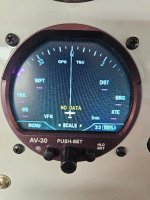
 

Attachments

  • 20250708_134032.jpg
    20250708_134032.jpg
    131.3 KB · Views: 16
Hey All...

I'm pretty much at the end of this trail, but I thought I would throw this out to the Van's experts see if I'm missing something. I have two AV-30s in my Bearhawk, one as an AI and the other as a DG. They are some of the first Aerovonics units, but they function really well with the exception of the GPS data not being displayed. Both AV-30s have the latest version of uAvionix software installed (0.3.5 and 3.1.1). I have them connected to my Garmin GNC420 for GPS data. Unfortunately, neither unit displays the GPS data. Approach Fast Stack did a fabulous job creating my harness and all the wires are correct. Tim Hass gave me a few suggestions and I checked them all. I rang the line from the back of the GNC420 tray (pin 56) all the way to pin 2 on the DB-15 connector that plugs into the AV30 and all was good. I checked for a short to ground and there wasn't any. The main RS232 output on channel 1 on the Garmin is set for Aviation, the GPS input for the AV30s is set to AV 9600, per uAvionics. Nothing. I even connected a multimeter to pin 2 on the DB-15 connector while the GNC420 was on to see if there was any data being transmitted and there was a steady and rhythmic fluctuation of DC voltage, so something is being transmitted. Both units have an AV-LINK installed. I removed them and plugged the DB-15 directly into the units and still no joy.

I have tried other formats such as NEMA 9600, Aviation No Alt, etc., and got nothing. At this point I *think* I have narrowed it down to only two remaining possibilities. Either the data from the Garmin is somehow corrupt and the AV-30s can't read it, or the AV-30s are faulty. I contacted an avionics shop to see if they could read the RS232 data out of the GNC420, but they said they could only do what I already did by checking DC voltage. I wish I had another GPS unit I could try to connect to the AV-30s, but I don't.

I have spent quite literally days on this issue and am pretty frustrated. Any insights would be GREATLY appreciated!
Dumb question but do you have the GPS source selected for serial 1 (pin 2) in the installation setup menu?
Figs
 
Get a USB to DB-9 cable for your PC. MS used to have a terminal program that will read the RS-232 data. I suspect it is still buried in windows somewhere. You van then confirm the 420 output. The garmin manuals have an appendix with the data format.
 
Get a USB to DB-9 cable for your PC. MS used to have a terminal program that will read the RS-232 data. I suspect it is still buried in windows somewhere. You van then confirm the 420 output. The garmin manuals have an appendix with the data format.
Sounds good. I’ll give that a try. It would have to be a USB to DB-15 male as the AV-30 input end is a DB-15 female. Thanks!
 
Last edited:
Sounds good. I’ll give that a try. It would have to be a USB to DB-15 male as the AV-30 input end is a DB-15 female. Thanks!
I think what Larry means is to plug it into a laptop and see what comes up on the terminal program. You should be able to see what is being transmitted.
 
Any chance you'll be at Oshkosh? Swing by the uAvionix booth with the AV-30 and I'd be happy test your unit there.
 
Yep, set up on Serial 1, same with the RS-232 output on the GNC420.
If I read the manual correctly the 420 outputs Aviation format on port 1 pin 56 at 9600 baud and does not have a NMEA setting, so it looks like the AV-30 should be set to AV 9600 on serial 1 Pin 2. Only one wire so a puzzle as to why is is not working. I assume the 420 has a GPS lock so has data to send?
 
If I read the manual correctly the 420 outputs Aviation format on port 1 pin 56 at 9600 baud and does not have a NMEA setting, so it looks like the AV-30 should be set to AV 9600 on serial 1 Pin 2. Only one wire so a puzzle as to why is is not working. I assume the 420 has a GPS lock so has data to send?
You are correct on all accounts. That’s why it’s such a puzzle.
 
2. Only one wire so a puzzle as to why is is not working. ?
You should always connect the signal ground wire on both sides with rs-232 unless positive the the two talking units are plugged directly into the same ground bus. This could be part of your problem. I know the garmin has signal ground pins. They can be shared.

Also, i think the garmin has discrete config settings for port 1 in and out. Be sure you set the out.
 
You should always connect the signal ground wire on both sides with rs-232 unless positive the the two talking units are plugged directly into the same ground bus. This could be part of your problem. I know the garmin has signal ground pins. They can be shared.
That's interesting. It is wired exactly as uAvionix has specified: three wires. One power, one ground and the RS232 from the GPS. I'll dig a little deeper into this.
 
That's interesting. It is wired exactly as uAvionix has specified: three wires. One power, one ground and the RS232 from the GPS. I'll dig a little deeper into this.
In place of a signal ground, you can bridge the ground wires from the two devices and then to ground bus; just make sure the gauge can handle both loads.. You can also just add a jumper between the two ground wires for testing.

If you have something like a forest of tabs that both of these units are plugged into, this is likely not your issue. But on more diverse setups, lots of folks have been burned by not using the signal ground in rs-xxx connections.

I would consider as your best course is a second wire that goes from the signal ground pin on the 420 and bridged to the ground wire on the av 30, assuming it doesn’t have a signal ground pin. This will give you a proper rs-232 connection.
 
Last edited:
That's interesting. It is wired exactly as uAvionix has specified: three wires. One power, one ground and the RS232 from the GPS. I'll dig a little deeper into this.
But that is NOT how garmin tells you to wire an rs-232 connection. They require a signal ground, using a signal ground pin. Some complex boards like the 420 require unique grounds in their rs-232 sub circuits. They isolate them from the main ground to suppress interference. The av is likely much simpler and doesn’t have such sophisticated architecture.

There must be a good ground path back to the 420 or there is nothing for the av to read and by design, this path is the signal ground.
 
Last edited:
In place of a signal ground, you can bridge the ground wires from the two devices and then to ground bus; just make sure the gauge can handle both loads.. You can also just add a jumper between the two ground wires for testing.

If you have something like a forest of tabs that both of these units are plugged into, this is likely not your issue. But on more diverse setups, lots of folks have been burned by not using the signal ground in rs-xxx connections.

I would consider as your best course is a second wire that goes from the signal ground pin on the 420 and bridged to the ground wire on the av 30, assuming it doesn’t have a signal ground pin. This will give you a proper rs-232 connection.
I'll look into that. I do have a common grounding point for everything...a forest of tabs. Even the lights in the wingtips are grounded there. Approach Fast Stack (they did my harness) and uAvionix have a good relationship. I would be surprised if this was an issue, but I will certainly pursue this. This is solvable and I really appreciate the input. Even though the learning during building process has stopped, the problem solving process never ends!
 
Have you checked the antenna? The chinese antennas dont last long, my GRT mini GA portable efis was acting catawompis after 4 years of working great. It was the antenna not antennaing, new 8 dollar chinese antenna off amazon fixerood it
 
Have you checked the antenna? The chinese antennas dont last long, my GRT mini GA portable efis was acting catawompis after 4 years of working great. It was the antenna not antennaing, new 8 dollar chinese antenna off amazon fixerood it
I have. I have a Garmin antenna that is specified for the unit. The GPS works just fine, the AV-30s aren’t displaying the data.
 
If its not showing the data than how can you be sure its working.....
The GPS works fine on the Garmin unit, totally usable. The Av-30 has the capability to display GPS data (track, etc.) from a GPS source, such as the GNC420. That's the issue...it's not seeing/displaying the GPS data. The plot thickens! I have some new info to post.
 
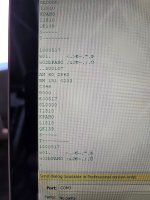
I connected my laptop to my Garmin GNC420 and I am reading data:
Get a USB to DB-9 cable for your PC. MS used to have a terminal program that will read the RS-232 data. I suspect it is still buried in windows somewhere. You van then confirm the 420 output. The garmin manuals have an appendix with the data format.


Attachments

  • 20250721_151621.jpg
    20250721_151621.jpg
    93.9 KB · Views: 18
  • IMG_2791.jpg
    IMG_2791.jpg
    343.7 KB · Views: 24
I connected my laptop to my Garmin GNC420 and I am reading data:


data looks good except for the garbage characters, but guessing that is the crc checksum data. Try different baud rates on the terminal program to see which one works, then compare to what the receiver is set for.
 
data looks good except for the garbage characters, but guessing that is the crc checksum data. Try different baud rates on the terminal program to see which one works, then compare to what the receiver is set for.
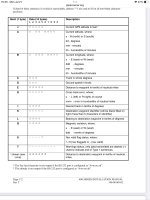
Sorry, spoke too soon. Note the prefixes for gps data fields are A & z. There is no gps data (lat/long or altitude) being sent on that connection. Hopefully that gets you pointed in the right direction. Have no idea why that data is omitted.
 
Sorry, spoke too soon. Note the prefixes for gps data fields are A & z. There is no gps data (lat/long or altitude) being sent on that connection. Hopefully that gets you pointed in the right direction. Have no idea why that data is omitted.
Look at lines A and B. That is the latitude and longitude.
 
Look at lines A and B. That is the latitude and longitude.
I see that now. Looked too quickly. .

Concerned about all of the junk before the message start. The z field should be the first thing, but there is a bunch of junk in front of it. The l field should be the last sentence . May want to send to garmin and ask if that is normal, I suspect it is not.
 
Last edited:
That happened to me when I installed the AV30C and it was a grounding issue at the unit. I too did it exactly as described in the installation manual but had to change the ground. Worked fine after that
 
That happened to me when I installed the AV30C and it was a grounding issue at the unit. I too did it exactly as described in the installation manual but had to change the ground. Worked fine after that
That's really interesting. When you say change the ground...what exactly did you do?
 
The data out of your navigator looks correct for the AV-30. The "junk" characters are expected. Those are flight plan data encoded in binary.

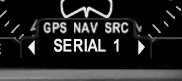
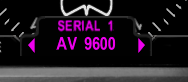
It sounds like these two settings are set in your AV-30:
1753324026310.png

1753324061303.png

As some people mentioned, RS-232 signals are referenced to ground. The AV-30 manuals assume the ground between the AV-30 and GPS will be common enough. In your video it looks like you just ran a wire to your airframe to Pin 5 on your USB-Serial adapter. It's a long shot, but instead of using the airframe, what if you used Pin 9 on your DB-15 connector. That should be an equivalent ground.
 
The data out of your navigator looks correct for the AV-30. The "junk" characters are expected. Those are flight plan data encoded in binary.

It sounds like these two settings are set in your AV-30:
View attachment 93302

View attachment 93303

As some people mentioned, RS-232 signals are referenced to ground. The AV-30 manuals assume the ground between the AV-30 and GPS will be common enough. In your video it looks like you just ran a wire to your airframe to Pin 5 on your USB-Serial adapter. It's a long shot, but instead of using the airframe, what if you used Pin 9 on your DB-15 connector. That should be an equivalent ground.
I can certainly give that a try.
 
I have installed a few AV-30's and for GPS signal I always use a single-conductor shielded wire with the signal wire going to the AV-30 Pin 2. I then bond the shielding to the dsub backshell on each end unless using a portable GPS. I use solder sleeves with a grounding wire to connect to the shielding. In the case of the portable GPS unit I bond the shielding at that end to the GPS's power ground wire. In a dual AV-30 install I split the GPS's RS232 TX wire in parallel at the GPS end from a common signal pin using two of the same type single-conductor shielded wires and run each of those independent signal wires to their respective AV-30's Pin 2. At no time have I connected a return signal wire from the AV-30 to the GPS. But keep in mind none of my installs have used accessories like AV-Link, AV-HSI etc. Those extra LRUs might want an RS-232 signal return wire. But I don't know for sure. If nothing else the shielding on the signal wire is providing the ground return path as mentioned above by posters who know more about this stuff than I. I originally did the shielded wire for RS-232 to avoid noise from EMI as suggested in my Garmin training class.
 
Last edited:
The data out of your navigator looks correct for the AV-30. The "junk" characters are expected. Those are flight plan data encoded in binary.

It sounds like these two settings are set in your AV-30:
View attachment 93302

View attachment 93303

As some people mentioned, RS-232 signals are referenced to ground. The AV-30 manuals assume the ground between the AV-30 and GPS will be common enough. In your video it looks like you just ran a wire to your airframe to Pin 5 on your USB-Serial adapter. It's a long shot, but instead of using the airframe, what if you used Pin 9 on your DB-15 connector. That should be an equivalent ground.
 
I have an older Apollo GX65 and recently replaced a nonfunctional NavAid with a Trio EZ Pilot AP (love it). I could not get the GX65 to send GPS to the Trio. Back and forth with support, checked and triple checked the connection and settings and it would not work (Trio displayed NO GPS). Then I went for a flight and hit the Direct button on the GX65 to a waypoint, looked down and the Trio had the GPS signal! It worked perfectly from then on. I discussed with support and they said they haven’t seen that before. I’ve now got about 9 months on it and it is 100% consistent. If I don’t hit direct or activate a flight plan on the GX65, the Trio doesn’t see any GPS reference. Part of after startup checklist now is to hit Direct – Enter on the GX65 and within seconds the Trio has a GPS lock and all works fine from then on. The GNC420 is slightly newer but who knows – once the GNC420 has a GPS lock, hit Direct and then Enter and see if anything changes. You said it was a good data stream so I’m assuming this won’t work but you never know.
 
That's exactly what I do for a GPS data test...I select a nearby airport and go direct. No Bueno! I tried a flight plan too. But that is an interesting circumstance that you had. Well done!
 
An update on this thread. I pulled both units out of the panel and sent them to uAvionix. Tech support received them and according to them I should allow 7-14 days for evaluation. More to follow as I get info from them...fingers crossed!
 
Back
Top