Van's Air Force

The definitive Van's Aircraft support community! Buying, building or flying an RV? Join our exclusive family of mentors and enthusiasts!

Emag EICAD software

RWoodard

Well Known Member
Sponsor
Hello everyone. A really nice guy answered the phone at eMagair last Friday. He was very helpful and emailed me their EICAD software so I could change the tach output voltage to 5 volts to be compatible with my ancient VM1000 engine monitor. Today, I built a very simple serial port wiring harness in hopes of using the software to make the necessary change. I’m not really a Windows guy, but I keep a laptop around for things just like this.

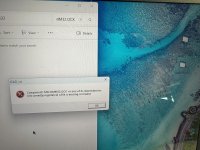
When I go to run the software, I get an error message saying “component MSO32.OCX or one of its dependencies not correctly registered: a file is missing or invalid.” Has something been corrupted in the software? Or is my computer just not compatible? I always run updates on my laptop operating system. Any chance my operating system is too new for the EICAD software? Any solution to this? Any alternative way to switch the output voltage and pulses per cycle?

I’m sure the young man at eMagair will get back to me soon, but I’m impatient so that’s why I’m posting here. If nothing else wherever and whenever I receive and answer, I’ll post it here for everyone to find in the future.

For what it’s worth, the reason I need to do this is that I’m swapping the Bendix mag out on the left-hand side of my RV-3 for a new eMag.

Thanks in advance!
 
Hello everyone. A really nice guy answered the phone at eMagair last Friday. He was very helpful and emailed me their EICAD software so I could change the tach output voltage to 5 volts to be compatible with my ancient VM1000 engine monitor. Today, I built a very simple serial port wiring harness in hopes of using the software to make the necessary change. I’m not really a Windows guy, but I keep a laptop around for things just like this.

When I go to run the software, I get an error message saying “component MSO32.OCX or one of its dependencies not correctly registered: a file is missing or invalid.” Has something been corrupted in the software? Or is my computer just not compatible? I always run updates on my laptop operating system. Any chance my operating system is too new for the EICAD software? Any solution to this? Any alternative way to switch the output voltage and pulses per cycle?

I’m sure the young man at eMagair will get back to me soon, but I’m impatient so that’s why I’m posting here. If nothing else wherever and whenever I receive and answer, I’ll post it here for everyone to find in the future.

For what it’s worth, the reason I need to do this is that I’m swapping the Bendix mag out on the left-hand side of my RV-3 for a new eMag.

Thanks in advance!
That is a legacy component from VB6. Assuming you are an admin on your windows box. From a command window.
regsvr32 /u MSCOMM32.OCX will force de-register it. If it was already de-registered you will get an error. Dont worry about it.
regsvr32 /i MSCOMM32.OCX will then re-register.
Close the command window and relaunch EICAD.

This will work for most windows components that throw the not registered error.
 
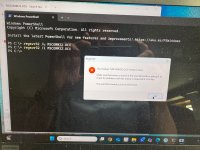
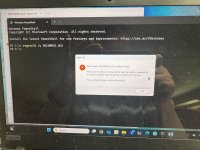
Thanks for the help. I believe I did exactly like you said, but it still gives the same message. See attached pics of my Windows screen…
 

Attachments

  • IMG_1190.jpeg
    IMG_1190.jpeg
    3.2 MB · Views: 24
  • IMG_1191.jpeg
    IMG_1191.jpeg
    2.8 MB · Views: 23
  • IMG_1192.jpeg
    IMG_1192.jpeg
    3.7 MB · Views: 23
Thanks for the help. I believe I did exactly like you said, but it still gives the same message. See attached pics of my Windows screen…
See if you can search for the file. It is probably in C:\Windows\System32 or it may be in C:\Windows\SysWOW64.

If you find it, then find the CMD app. Right click it and open as Administrator. Try running the same commands but use the full directory structure.

Ex. regsvr32 /u C:\Windows\System32\MSCOMM32.OCX
 
See if you can search for the file. It is probably in C:\Windows\System32 or it may be in C:\Windows\SysWOW64.

If you find it, then find the CMD app. Right click it and open as Administrator. Try running the same commands but use the full directory structure.

Ex. regsvr32 /u C:\Windows\System32\MSCOMM32.OCX
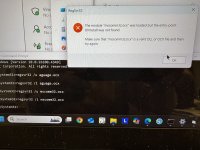
I tried searching for MSCOMM32 and couldn't find it anywhere so I downloaded it and then dragged and dropped it in System32 and SysWOW64. I tried to run the program and received the error in the attached picture.

I really appreciate your help with this. Believe it or not, I used to teach this stuff and provide computer support... 30 years ago! Of course nothing has changed since then! I remember buying a 300MB external hard drive for my Mac LC desktop computer. It was $300. Imagine that. $1 per MEGAbyte. Extrapolating those prices, my iPhone would cost in the neighborhood of $512,000.IMG_1197.jpeg
 
I bought 2 P-mags a year ago. Had an P-mag software problem that I wanted to solve with the EICAD program. I have repeatedly asked to provide me with the EICAD software, but I always received a negative answer. (You don't need this) Since Emagair was sold, my emails are no longer answered. I fear that the support will continue to deteriorate.
Question: does anyone use the EICAD software, perhaps a copy can be made.
Thanks in advance
Wilfried
 
Thanks for The help, CTH6, but hold off on doing anything or thinking any more about this issue. Laying in bed last night I remembered that I have an enginebridge.com controller and pulled up the manual at 2 AM. Apparently it has the ability to make the change I need in the mag. I’m in the process of building a simple harness to test my theory. I will update this thread if the controller provides the help I’m looking for.

@Glastar F-xxxx: I actually talked to a real live person last Friday as I mentioned in my original post. He was very helpful and very willing to chat. He is part of the original E mag team in Texas. He plans to continue on to develop an electronic ignition for radial engine engines and has the permission of Hartzel to pursue this market. A very nice young man.

I too fear that support will falter and prices will rise as the Hartzel transition progresses. It just hasn’t happened quite yet in my experience. I want to give credit where it’s due.
 
I also have the software, v3 and v4 but I now use the Engine Bridge via phone browser, though I still use it on customer P-Mags to set base timing and max advance.

To use the software on Win10 or Win11, you will likely need to run the app in compatibility mode so it thinks it is running on XP. I still run it on Win7 but not sure if I needed to use XP compatibility.
 
IMG_1061.jpeg


Woo hooo! Success!

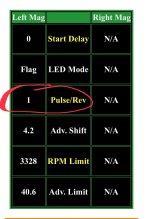
I set up a very basic harness to use my enginebridge.com controller to access the settings on my pMag. It worked! I needed to adjust the Pulses per Revolution setting from the normal 2ppr to 1ppr in order for the mag RPM output to be compatible with the VM1000 display in my RV-3. I’ll also need to install a diode inline to knock the output voltage from 12 to 5 volts for the VM1000 input. The updated settings are stored in the non-volatile memory on the pMag, so I don’t *have* to make the enginebridge.com controller a part of the permanent installation on my RV. I had originally purchased the controller for use with the G3x system I’m installing in my Glasair… that’s why I didn’t immediately think of it for solving the RV-3 installation issue.

I’m fully committed to pMags at this point. I’ll now have dual pMags in the RV and I’ll have dual pMags in the Glasair if I ever finish that project! pMag #4 is arriving via UPS from Aircraft Spruce today.
 

I also have the software, v3 and v4 but I now use the Engine Bridge via phone browser, though I still use it on customer P-Mags to set base timing and max advance.

To use the software on Win10 or Win11, you will likely need to run the app in compatibility mode so it thinks it is running on XP. I still run it on Win7 but not sure if I needed to use XP compatibility.

I also have the software, v3 and v4 but I now use the Engine Bridge via phone browser, though I still use it on customer P-Mags to set base timing and max advance.

To use the software on Win10 or Win11, you will likely need to run the app in compatibility mode so it thinks it is running on XP. I still run it on Win7 but not sure if I needed to use XP compatibility.
Sent PM
 
Back
Top