

Van's Air Force
You are using an out of date browser. It may not display this or other websites correctly.
You should upgrade or use an alternative browser.
You should upgrade or use an alternative browser.
TOGA button.
- Thread starter Speedbird1
- Start date

Check this out: https://www.steinair.com/product/push-button-switch-dpdt-momentary/Hello folk -
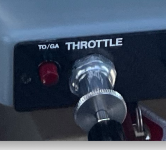
Can anyone tell me where I might be able to obtain the following TOGA button?
Thank you.
Thanks. I found that one already, but I like the collar on the one I pictured.
Ah, that was hard to see. Maybe this one? https://www.aircraftspruce.com/catalog/elpages/p1momswitch.phpThanks. I found that one already, but I like the collar on the one I pictured.
it's close but the original one doesn't have the slopped bezel on after the collar. I though it was pretty common for some reason.

Here are a couple: https://www.mouser.com/ProductDetai...gies/NX303GB1B-62?qs=chTDxNqvsynlpqGYvicnYA==
And https://www.otto-controls.com/-/med...ade/P1-Pushbutton-Switches-Catalog-Pages.ashx, style P1-7.
If you have a 650/750 and G3X, you need a DPST switch, unless you want to fool around with a relay. Switch below meets that requirement.
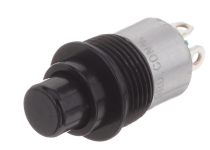
And https://www.otto-controls.com/-/med...ade/P1-Pushbutton-Switches-Catalog-Pages.ashx, style P1-7.
If you have a 650/750 and G3X, you need a DPST switch, unless you want to fool around with a relay. Switch below meets that requirement.

If you have a 650/750 and G3X, you need a DPST switch, unless you want to fool around with a relay.
For this application I'd probably look at steering diodes before I considered a relay.

I have (2) G3X (non touch) and GTN 650. An DPST switch (mine is from Stein) works perfectly. They have a red version, but not like yours pictured. Let us know if you need wiring help and adjusting pitch.

I was planning to use a standard SPST with some signal diodes to send the ground to the autopilot controller and the gps.Here are a couple: https://www.mouser.com/ProductDetail/Amphenol-Nexus-Technologies/NX303GB1B-62?qs=chTDxNqvsynlpqGYvicnYA==
And https://www.otto-controls.com/-/med...ade/P1-Pushbutton-Switches-Catalog-Pages.ashx, style P1-7.
If you have a 650/750 and G3X, you need a DPST switch, unless you want to fool around with a relay. Switch below meets that requirement.
View attachment 83962
I liked the 0.250 connectors on this one:
C936KB | DigiKey Electronics
Order today, ships today. C936KB – Pushbutton Switch SPST-NO Standard Panel Mount, Rear from Bulgin. Pricing and Availability on millions of electronic components from Digi-Key Electronics.
From the Garmin manual:What does this button do?
"TO/GA Button(Takeoff/Go Around) - Selects flight director Takeoff (on ground) or Go Around (in air) Mode. When properly configured with a GTN, if an approach procedure is loaded, this switch also activates the missed approach when the selected navigation source is GPS or when the navigation source is VOR/LOC and a valid frequency has been tuned."
"Go Around and Takeoff modes are coupled pitch and roll modes and are annunciated as both the vertical and lateral modes when active. In these modes, the flight director commands a constant set pitch attitude and keeps the wings level. The GA Switch is used to activate both modes. The mode entered by the flight director depends on whether the aircraft is on the ground or in the air. Takeoff Mode provides an attitude reference during rotation and takeoff. This mode can be selected only while on the ground by pushing the TO/GA Button. The flight director Command Bars assume a wings-level, pitch-up attitude. Takeoff Mode always disengages the autopilot when activated. Pressing the TO/GA Button while in the air activates the flight director in a wings level, pitch-up attitude, allowing the execution of a missed approach or a go around. Go Around Mode arms Selected Altitude Capture Mode automatically, and attempts to modify the aircraft attitude (i.e., with the NOSE UP/DN Wheel or FMS Joystick) result in reversion to Pitch and Roll Hold modes. Go Around Mode disengages the autopilot if a minimum airspeed is not configured."

walkman
Well Known Member
From the Garmin manual:
"TO/GA Button(Takeoff/Go Around) - Selects flight director Takeoff (on ground) or Go Around (in air) Mode. When properly configured with a GTN, if an approach procedure is loaded, this switch also activates the missed approach when the selected navigation source is GPS or when the navigation source is VOR/LOC and a valid frequency has been tuned."
"Go Around and Takeoff modes are coupled pitch and roll modes and are annunciated as both the vertical and lateral modes when active. In these modes, the flight director commands a constant set pitch attitude and keeps the wings level. The GA Switch is used to activate both modes. The mode entered by the flight director depends on whether the aircraft is on the ground or in the air. Takeoff Mode provides an attitude reference during rotation and takeoff. This mode can be selected only while on the ground by pushing the TO/GA Button. The flight director Command Bars assume a wings-level, pitch-up attitude. Takeoff Mode always disengages the autopilot when activated. Pressing the TO/GA Button while in the air activates the flight director in a wings level, pitch-up attitude, allowing the execution of a missed approach or a go around. Go Around Mode arms Selected Altitude Capture Mode automatically, and attempts to modify the aircraft attitude (i.e., with the NOSE UP/DN Wheel or FMS Joystick) result in reversion to Pitch and Roll Hold modes. Go Around Mode disengages the autopilot if a minimum airspeed is not configured."
Does this activate the missed approach before you get the "remain suspended/activate missed" options? Ie if for some reason I want to go missed before I've reached that point on the approach?
Would this work with a GTN650 and a GRT EFIS? Right now I have to hit the Missed button on the EFIS (right hand) and the "Activate Missed" on the 650 (left hand) to fly the missed.

When I installed the GPS175 I was going to add a TO/GA button but then with the "activate missed" on the screen why bother with a button?Does this activate the missed approach before you get the "remain suspended/activate missed" options? Ie if for some reason I want to go missed before I've reached that point on the approach?
What does this button
Button adds more fuctionality that that. It commands the autopilot to pitch up, sets roll mode and then re-engages NAV mode automatically. Only pilot action is to add throttle.When I installed the GPS175 I was going to add a TO/GA button but then with the "activate missed" on the screen why bother with a button?

I have been in discussion with GRT on this.When I installed the GPS175 I was going to add a TO/GA button but then with the "activate missed" on the screen why bother with a button?
The "MISSED" button on the GRT screen commands the autopilot to (assuming you also add (full) throttle to climb ahead at (I think) 5 degree pitch up but with an airspeed no lower than (?? I forget as I am writing this). This does NOT take you to the next waypoint and hold etc. The Navigator must be commanded to do that (select on screen if not configured with TOGA).
What I think we want (and what I discussed) was one button that is connected to the "TOGA" input of the Navigator **AND** connected the EFIS and commands the GRT "MISSED" action.
The request is understood and how to do it is understood. There was NO discussion about an actual IF or WHEN.
[Although I did say though that I hope that it eventually gets done and done "soon".
 ]
]
From the Garmin manual:
"TO/GA Button(Takeoff/Go Around) - Selects flight director Takeoff (on ground) or Go Around (in air) Mode. When properly configured with a GTN, if an approach procedure is loaded, this switch also activates the missed approach when the selected navigation source is GPS or when the navigation source is VOR/LOC and a valid frequency has been tuned."
Thanks for defining. Acronyms ought to be spelled out in first time used.
I haven’t worn my toga since college.
Hopefully college for you was prior to everyone having a camera on their phone. Unfortunately for me someone still had a Kodak 110 in tow at the toga party when I was in college.I haven’t worn my toga since college.

But only if they aren't part of the common vernacular for the audience. Even 172's have a TOGA button now. In a group like this it's easy to forget that not everyone has the same background/experience level"Acronyms ought to be spelled out in first time used."
therein lies the explanation for why this went so off-topic.I haven’t worn my toga since college.
walkman
Well Known Member
For my case I have to hit the MISSED button on the EFIS and then tap the same button on the GTN650. It's easiest for me to switch hands to do this.When I installed the GPS175 I was going to add a TO/GA button but then with the "activate missed" on the screen why bother with a button?
Would be much better to simply press a single button to activate the missed.
Unfortunately I don't think there's a TOGA input on the GTR HXr nor an output that could trigger the remote input on the GTN.
Failing either of those options, next best for me is a thumb button on/near my throttle.
walkman
Well Known Member
What we need is an assignable input on one of the aux inputs that when momentarily grounded activates MISSEDI have been in discussion with GRT on this.
The "MISSED" button on the GRT screen commands the autopilot to (assuming you also add (full) throttle to climb ahead at (I think) 5 degree pitch up but with an airspeed no lower than (?? I forget as I am writing this). This does NOT take you to the next waypoint and hold etc. The Navigator must be commanded to do that (select on screen if not configured with TOGA).
What I think we want (and what I discussed) was one button that is connected to the "TOGA" input of the Navigator **AND** connected the EFIS and commands the GRT "MISSED" action.
The request is understood and how to do it is understood. There was NO discussion about an actual IF or WHEN.
[Although I did say though that I hope that it eventually gets done and done "soon".
AND
we need an OUTPUT that will repeat the input such that it will sink/ground the input, so that can be connected to the TOGA input on the remote NAV unit
I suggest an output following the input rather than a DPST (mom) switch to avoid issues of one pole of the switch failing and activating missed on one device and not the other. Repeating an output allows logic to ensure that the output is grounded only when the EFIS MISSED logic is activated.


Yes. I concur.What we need is an assignable input on one of the aux inputs that when momentarily grounded activates MISSED
AND
we need an OUTPUT that will repeat the input such that it will sink/ground the input, so that can be connected to the TOGA input on the remote NAV unit
I suggest an output following the input rather than a DPST (mom) switch to avoid issues of one pole of the switch failing and activating missed on one device and not the other. Repeating an output allows logic to ensure that the output is grounded only when the EFIS MISSED logic is activated.
And with what I *think* is my understanding of their architecture, this should be VERY easy to do. Maybe a few of lines of code, all safety checks notwithstanding. Activation using just a button without the navigator follow efis approach, while not as good, would be even simpler, I think.
Or just use an SPST momentary switch and 2 1N914 diodes.What we need is an assignable input on one of the aux inputs that when momentarily grounded activates MISSED
AND
we need an OUTPUT that will repeat the input such that it will sink/ground the input, so that can be connected to the TOGA input on the remote NAV unit
I suggest an output following the input rather than a DPST (mom) switch to avoid issues of one pole of the switch failing and activating missed on one device and not the other. Repeating an output allows logic to ensure that the output is grounded only when the EFIS MISSED logic is activated.
-Bob
rapid_ascent
Well Known Member
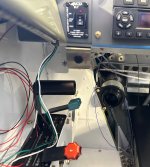
Here is what I did, which is what Matt is referring to. The Otto switches come in higher operating force version too, but I didn't like the higher force version. I can't remember where I got them just google the part number. There are also versions with a larger bezel but I didn't want that.
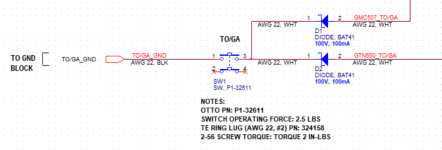
Do you need the diodes between the switch and the devices?Here is what I did, which is what Matt is referring to. The Otto switches come in higher operating force version too, but I didn't like the higher force version. I can't remember where I got them just google the part number. There are also versions with a larger bezel but I didn't want that.
View attachment 86934

Yes, or wire in a DPST. Both devices need to be independently isolated.Do you need the diodes between the switch and the devices?
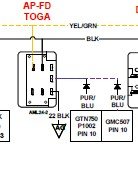
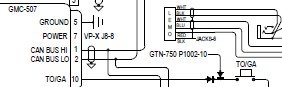
Last edited:
Oh, I missed that the two devices were spliced together. Would you need the diodes if you spliced the ground side wires and separated the devices onto pins 3 & 4 of the switch in the picture posted by rapid_ascent?
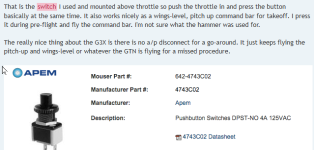
Others know this 100 times better than me but my understanding as long as you keep the 2 grounds electrically isolated that would be ok, AKA a DPST momentary switch which an OTTO P1-32611 is. I believe most use diodes (me) because the selection of SPST switches is better and easier to obtain.Oh, I missed that the two devices were spliced together. Would you need the diodes if you spliced the ground side wires and separated the devices onto pins 3 & 4 of the switch in the picture posted by rapid_ascent?
Last edited:
Nope in that case you don't need the diodes. The reason for the diodes is that some devices pull their pin to ground when they are turned off. This will activate TO/GA on the other device if you have connected the two devices together without having either diodes or the two pins of the DPST in between them.Oh, I missed that the two devices were spliced together. Would you need the diodes if you spliced the ground side wires and separated the devices onto pins 3 & 4 of the switch in the picture posted by rapid_ascent?
walkman
Well Known Member
still leaves the potential for one to be activated without the other, and in this case with 4 connections and a diode waiting to fail, which would be eliminated by doing it in logicHere is what I did, which is what Matt is referring to. The Otto switches come in higher operating force version too, but I didn't like the higher force version. I can't remember where I got them just google the part number. There are also versions with a larger bezel but I didn't want that.
View attachment 86934
