Van's Air Force

The definitive Van's Aircraft support community! Buying, building or flying an RV? Join our exclusive family of mentors and enthusiasts!

Adding a Garmin G5

rcarsey

Well Known Member
So the latest RV-12iS/Garmin wiring diagram from Vans has a couple extra CAN bus pins going to the MFD screen's connector that are labeled "G5". The engineers parked the pins on the MFD in positions that aren't used for the G3X.. So they're there to easily extend the CAN bus to a G5. Along with that, the EFIS power circuit (7.5A) is using about 3A in real life, so the extra 250mA for a G5 isn't a big deal...

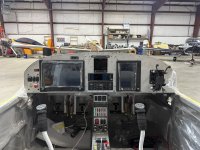
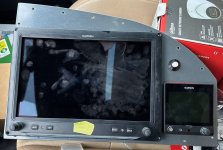
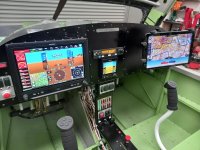
So after spending 3 hours of thinking, planning, cutting, and filing down a 3" hole for the G5.. I realized that that there is interference from the aluminum bar which supports the plexiglass canopy (the same bar that caused many G3X builders to file down the corners of the G3x and/or the bar itself). However, given the near-bezel-less design of the G5, there isn't anything to file down.. and the interference (at least where I positioned it) is too great to cut into the aluminum bar.

Has anyone gotten the G5 to fit in this location? I think the only (and actually the easiest option.. the one I probably should have started with) is to recess-mount the G5. I'm not thrilled on how it will look, but it seems the only way to avoid cutting into some things that I don't really want to cut into..
 

Attachments

  • 0E7E376D-35E0-4639-BDC1-A2AA6EFE8188.jpg
    0E7E376D-35E0-4639-BDC1-A2AA6EFE8188.jpg
    251.9 KB · Views: 134
I went a bit of a different route.

A bit of British compromise between a full Garmin fit, acceptability, avoiding a major panel redesign and modification.

In the UK we must have independant back up instruments and these or this, in the case of a G5, must be in the line of sight of the pilot. Thus sighting the G5 over on the far right would not be acceptable. The second MFD cannot act as a back up in this instance as it's the same as the PFD. So, if you want a G5 as well, you become a bit short of panel space.

John.
 

Attachments

  • 20211108_134448.jpg
    20211108_134448.jpg
    333.5 KB · Views: 114
So the latest RV-12iS/Garmin wiring diagram from Vans has a couple extra CAN bus pins going to the MFD screen's connector that are labeled "G5". The engineers parked the pins on the MFD in positions that aren't used for the G3X.. So they're there to easily extend the CAN bus to a G5. Along with that, the EFIS power circuit (7.5A) is using about 3A in real life, so the extra 250mA for a G5 isn't a big deal...

So after spending 3 hours of thinking, planning, cutting, and filing down a 3" hole for the G5.. I realized that that there is interference from the aluminum bar which supports the plexiglass canopy (the same bar that caused many G3X builders to file down the corners of the G3x and/or the bar itself). However, given the near-bezel-less design of the G5, there isn't anything to file down.. and the interference (at least where I positioned it) is too great to cut into the aluminum bar.

Has anyone gotten the G5 to fit in this location? I think the only (and actually the easiest option.. the one I probably should have started with) is to recess-mount the G5. I'm not thrilled on how it will look, but it seems the only way to avoid cutting into some things that I don't really want to cut into..
Need to be a little careful, it isn't really possible to "park" the G5 can bus interface. The end of the can bus must be terminated with a 120 ohm resistor or the can bus wont work correctly. On a GDU that is done internally by grounding a pin. On the G5 it requires a termination plug (supplied in the G5 install kit).
 
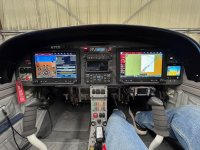
Here’s my final configuration. Achieved with a GPS 175 and by eliminating the GTR200 - going completely remote with 2 remote coms and remote audio panel. IMG_0861.jpeg
 
I noticed the extra pins were only in the IFR avionics package diagram. Thought it was in the VFR ones too.
 

Attachments

  • 2025-04-15 16_40_12-WH-00136-3.jpg
    2025-04-15 16_40_12-WH-00136-3.jpg
    51.4 KB · Views: 16
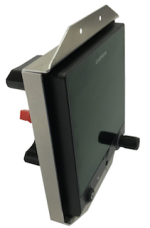
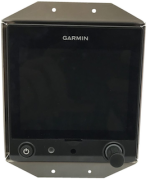
Flush mounting is always an option. The do have premade brackets for this. (https://www.steinair.com/product/garmin-g5-flush-mount-bracket/). It looks like you have the factory powder coated panel. So getting an exact match to paint over rivets would be nearly impossible. Instead of riveting the bracket to the panel, it may look better to add nutplates to the bracket and secure it using the same screws used around the perimeter of the panel. (The existing holes in the premade bracket also appear to be somewhat close together. I wouldn't hesitate to drill new ones if it would make the screw head placement slightly more appealing).

Screenshot 2025-04-17 at 7.59.50 AM.pngScreenshot 2025-04-17 at 8.21.25 AM.png

The difficult part of making this a nice looking install will be getting clean and straight cuts in your panel. If you're careful and take your time, it should be possible to get good results using hand tools. However, if you have access to some CNC capabilities, that might be a good option.

If you don't like the flush mount, it should be possible to fabricate a spacer to move it out some. (I'm not sure how far you can space it out. The only reference to panel thickness I saw in the instructions was to replace the captive mounting screw if your panel thickness is over 0.15") However, if I was going this route, I would 3d print a custom mounting bracket to get the exact depth and screw placement I wanted.
 
Flush mounting is always an option. The do have premade brackets for this. (https://www.steinair.com/product/garmin-g5-flush-mount-bracket/). It looks like you have the factory powder coated panel. So getting an exact match to paint over rivets would be nearly impossible. Instead of riveting the bracket to the panel, it may look better to add nutplates to the bracket and secure it using the same screws used around the perimeter of the panel. (The existing holes in the premade bracket also appear to be somewhat close together. I wouldn't hesitate to drill new ones if it would make the screw head placement slightly more appealing).

View attachment 85473View attachment 85474

The difficult part of making this a nice looking install will be getting clean and straight cuts in your panel. If you're careful and take your time, it should be possible to get good results using hand tools. However, if you have access to some CNC capabilities, that might be a good option.

If you don't like the flush mount, it should be possible to fabricate a spacer to move it out some. (I'm not sure how far you can space it out. The only reference to panel thickness I saw in the instructions was to replace the captive mounting screw if your panel thickness is over 0.15") However, if I was going this route, I would 3d print a custom mounting bracket to get the exact depth and screw placement I wanted.
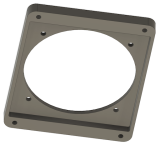
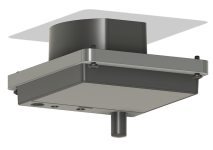
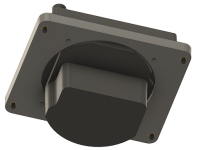
Thinking about this more, I really like the idea of a custom 3d printed mount. Here's an example of one I threw together.
Screenshot 2025-04-17 at 2.27.23 PM.pngScreenshot 2025-04-17 at 2.26.55 PM.pngScreenshot 2025-04-17 at 2.32.29 PM.png

This one recesses the G5 0.25", mounts with four 0608MPP-BO into heat press inserts, and the plastic (ASA) should weigh in at just under 22 grams. You would still need to make a nice rectangular cutout in your panel and touch up the sides with some dark paint.
 
Here’s my final configuration. Achieved with a GPS 175 and by eliminating the GTR200 - going completely remote with 2 remote coms and remote audio panel. View attachment 85332
Off subject but your foam grips are upside down. I did the same thing; it's a pain drilling the rivets out. Tip, use compressed air to expand the foam and it easily slips on.
 
Thanks for chiming in. I played with them both ways and don’t like how they leave a gap on the bottom right where the sticks curve. I’ve got rubber grips to swap out. Additional tip… leave a little extra wire and connect near the top with mini molex connectors.
 
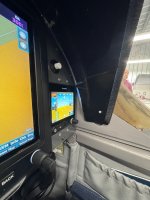
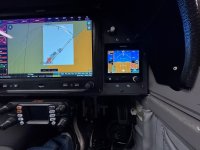
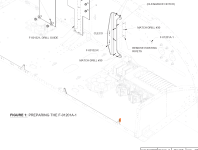
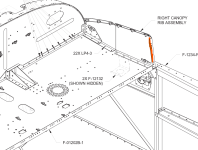
Ok so I finished the install today. I ended up doing the G5 recess-mount from Stein/Aircraft Spruce (i don't think its a Garmin product). The exact placement of the G5 could have been a little better.... but because I was also trying to completely use/cover-up the 3" hole I erroneously drilled.. the exact placement suffered and led to some interference (diagrams below).

Out of the box, the G5 isn't completely flush.. it sticks out about 1/8", which in my opinion, looks better than completely flush. It also provides about 1/4" clearance from the canopy's front frame. If I hadn't erroneously drilled the 3" hole from the beginning, I would have moved UP about 1/8" and LEFT about 1/4" -- leaving about 1/16" clearance between the G3X and G5 bezels (or possibly have them touch, but I wanted avoid unnecessary vibration of the G5). Unfortunately, I had to cut away at some structure behind the panel and I lost one of the nutplates on the right canopy rib (see last picture).

I also relocated and "upgraded" the PTT button with one that has a tactile clickity click feedback -- for a PTT, it takes a little too much pressure to activate (4 lbs is a lot for a PTT. its acceptable.. but nobody is going to be accidentally pressing it).. Unfortunately Aircraft Spruce only carried the 4lb variety.. Otto has a 2½ lb version that would probably be better).

I'm also not thrilled about the 4 LP4-3 rivets .. I'll probably change them out to black oxide screws some day.
 

Attachments

  • IMG_6270.jpg
    IMG_6270.jpg
    420.7 KB · Views: 115
  • IMG_6269.jpg
    IMG_6269.jpg
    500 KB · Views: 128
  • IMG_6268.jpg
    IMG_6268.jpg
    531.2 KB · Views: 130
  • Interference2.png
    Interference2.png
    198.5 KB · Views: 114
  • Interference1.png
    Interference1.png
    166.1 KB · Views: 114
Last edited:
Back
Top