Van's Air Force

The definitive Van's Aircraft support community! Buying, building or flying an RV? Join our exclusive family of mentors and enthusiasts!

Video camera with Bluetooth that works in flight?

scottmillhouse

Well Known Member
I know products and technology keeps changing so I’m posting a new thread. I want a battery powered video camera to mount on my wing that I can control by Bluetooth from in cockpit from my IPad or phone. Fancy functions not needed. Seeing video would be nice but I really want to as a minimum to turn in on and off to capture just portions of a flight. Experience with different products? I know GoPro has said they have that capability but a friend has never had his communicate.
 
I’ve had fun with my Insta360 and it will do what you want. Ideas on mounting it on your wing are here:
 
GoPro allows controlling multiple cameras either through their dedicated remote they sell, or through an app.
As a bonus, they’ll write accelerometer/gyro/position data to a track in the video file, and there’s some cool apps that allow visualizing that.
 
Had good experience with my 2 Insta360 cams. But forget the "battery powered" thing... exposed to cold Ts, the battery will merely last 10, 20 minutes at most. So I did install 2, 1 in the tail and 1 in the wing, 12 to 5V converters that will supply those cams.
Of course you still have to start them before flying (unless you're a circus acrobat and happy to open your canopy in flight to switch 'em on...), test them. The cams will then go in standby mode, and can usually (can take some persuasion) be awaken and started in flight.
 
Scott,

If you have a G3X, an Aera 660 or a 760 they all have built in wireless proprietary software to start/stop the recording function of the Garmin VIRB Ultra 30 and the Garmin 360 cameras. You just have to make sure to power on the camera before you climb in. You can also pair the camera to your Bluetooth intercom for real time audio onto the camera. I have an Aera 660 backup GPS that I use to control the camera and I Bluetooth the audio from my Garmin GMA 245 intercom panel. Works great with both cameras.
 
I fly with a Dynon Skyview HDX and a new Ipad. It would be nice to stream to Ipad but really I just need to have camera in standby and stop and start from Ipad. Was planning on relatively short sessions like maybe last 30 minutes into Oshkosh so I wanted to run on battery power and not run any more wiring. On my RV-12 was thinking of installing mid wing at tie down post connection for either above or below wing connection. Since it connects to the wing spar it should be very stable. Thinking a normal action camera that i could use for both airplane and driving events.
 
I fly with a Dynon Skyview HDX and a new Ipad. It would be nice to stream to Ipad but really I just need to have camera in standby and stop and start from Ipad. Was planning on relatively short sessions like maybe last 30 minutes into Oshkosh so I wanted to run on battery power and not run any more wiring. On my RV-12 was thinking of installing mid wing at tie down post connection for either above or below wing connection. Since it connects to the wing spar it should be very stable. Thinking a normal action camera that i could use for both airplane and driving events.
If you download the Garmin VIRB App on your IPad you can control the start/stop of Garmin cameras with your IPAD. I believe GoPro can do the same thing
 
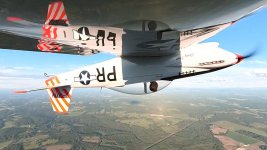
I have an Insta360 OneRS mounted out on the wing. I never had much success with remotes until I paired it with the Insta 360 GPS remote. Game changer. Nothing fancy, (other than it does give you the option of GPS data, speed etc onto your video) but it just works. Change from video to still to burst to time lapse and control the shutter. What I like most is that I can turn the camera off to save battery power when there is nothing to shoot and then turn it on again later when things get interesting.VID_20220611_191757_00_005_2022-06-12_13-52-03_screenshot.jpeg
 
Last edited by a moderator:
I often run two GoPro Hero 12 cameras and one GoPro 360 all from my phone in flight. I use an Android phone too... so I can confirm the GoPro app works with Apple or Android. I change my camera locations around depending on the mission however I often have two mounted externally and one internally.

Prior to cranking up I turn the cameras on, then place them into a standby mode from my phone until I'm ready for them to start recording. When you're ready its easy to turn them on via the App, then push record. Job done. You can cycle them on and off as much as you like until the battery goes flat, then you have to wait until you land to swap out the batteries. Typically they'll last an hour or so when recording. I've not tried wing-walking to replace the batteries in flight.

Here's a link to the video I uploaded earlier this week, using two cameras placed on the wingtip and controlled in this way.


There are other videos on the channel too if you're interested. Its a lot of fun. Having one camera inside allows you to capture audio and adds to the perspective.

With the GoPro QWIK App you can change some of the camera settings from the cockpit in flight and while recording you can see the preview. I used to use the GoPro remote control when I ran a single Hero 4 camera however I found that when the camera was mounted under the wing it could be a little unrelieable. Maybe there was too much aluminium in the way, but turning the camer on an off was sometimes difficult. I've not had these issues with the Hero 12 and the QWIK app.

 
Last edited:
I often run two GoPro Hero 12 cameras and one GoPro 360 all from my phone in flight. I use an Android phone too... so I can confirm the GoPro app works with Apple or Android. I change my camera locations around depending on the mission however I often have two mounted externally and one internally.

Prior to cranking up I turn the cameras on, then place them into a standby mode from my phone until I'm ready for them to start recording. When you're ready its easy to turn them on via the App, then push record. Job done. You can cycle them on and off as much as you like until the battery goes flat, then you have to wait until you land to swap out the batteries. Typically they'll last an hour or so when recording. I've not tried wing-walking to replace the batteries in flight.

Here's a link to the video I uploaded earlier this week, using two cameras placed on the wingtip and controlled in this way.


There are other videos on the channel too if you're interested. Its a lot of fun. Having one camera inside allows you to capture audio and adds to the perspective.

With the GoPro QWIK App you can change some of the camera settings from the cockpit in flight and while recording you can see the preview. I used to use the GoPro remote control when I ran a single Hero 4 camera however I found that when the camera was mounted under the wing it could be a little unrelieable. Maybe there was too much aluminium in the way, but turning the camer on an off was sometimes difficult. I've not had these issues with the Hero 12 and the QWIK app.

Hello Mike,
I own an RV8 and have been looking for ways to video some flights. You have used GoPro Hero 12 with App phone control to turn on/off which is a great ideal with external mounts. Some of the questions I have are:
- How do you connect the audio from headsets?
- What video editing software are you using?

Appreciate your insights. Best regards,
Mario
RV8 N151BL
 
Some of the questions I have are:
- How do you connect the audio from headsets?
- What video editing software are you using?
Gidday Mario. Thanks for your kind words on the videos.

For audio I use the standard audio connections that you can buy from any number of places - usually pilot shops. I have LEMO plugs on my headsets so I needed to find a suitable harness for that option, however they're still easy to come by. A quick search on the 'net pinged up a few stores with lots of options, but shop around - for example you could try "mypilotstore.com" and search "headset connections".

For editing, I used to use the GoPro program on my PC but I found it was very limited in what it could do, so 6 months ago I moved to Davinci Resolve. I had to upgrade my old computer anyway so I made sure I spec'd up the new system to cope with the video editing requirements. The free version of Davinci Resolve is outstanding and while it took me a couple of months to get used to it I'm finding it to be very user-friendly now I have my head around it. A friend of mine uses an Adobe product and tells me its good, and there is nothing wrong with his videos either.

Hope that helps.
 
Gidday Mario. Thanks for your kind words on the videos.

For audio I use the standard audio connections that you can buy from any number of places - usually pilot shops. I have LEMO plugs on my headsets so I needed to find a suitable harness for that option, however they're still easy to come by. A quick search on the 'net pinged up a few stores with lots of options, but shop around - for example you could try "mypilotstore.com" and search "headset connections".

For editing, I used to use the GoPro program on my PC but I found it was very limited in what it could do, so 6 months ago I moved to Davinci Resolve. I had to upgrade my old computer anyway so I made sure I spec'd up the new system to cope with the video editing requirements. The free version of Davinci Resolve is outstanding and while it took me a couple of months to get used to it I'm finding it to be very user-friendly now I have my head around it. A friend of mine uses an Adobe product and tells me its good, and there is nothing wrong with his videos either.

Hope that helps.
Hey Mike,
Thank you for your insights, your videos were awesome indeed! I'll look for Audio Connections to headsets as you suggested and will give it a try video editing on my mac, they have an app called imovie. If it doesn't work well, will look for the apps you suggested for mac. Thanks again and Happy New Year!
 
Hey Mike,
Thank you for your insights, your videos were awesome indeed! I'll look for Audio Connections to headsets as you suggested and will give it a try video editing on my mac, they have an app called imovie. If it doesn't work well, will look for the apps you suggested for mac. Thanks again and Happy New Year!
I take it you're down under in New Zealand? how's the experimental community down there? Best regards
 
Yep, New Zealand. That's why all my videos are upside down on your screen. :D

The experimental community is good here. Lots of cool machines of all makes and models and using all kinds of construction methods. There are a handful of "own designs" too and I take my hat off to those who have undertaken that level of commitment. I don't know what the total body count of homebuilt aircraft is, however its in the multiple hundreds.

In terms of RV's, I note we have around 105 registered and flying here with pleny more under construction - every type except the RV-15, but that will change! :)
 
Hey Mike,
Thank you for your insights, your videos were awesome indeed! I'll look for Audio Connections to headsets as you suggested and will give it a try video editing on my mac, they have an app called imovie. If it doesn't work well, will look for the apps you suggested for mac. Thanks again and Happy New Year!
Apple iMovie is a very capable (free) editor, and a great place to start. Most good editors (including DaVinci Resolve, though I have not used it) are available on macOS. Apple's professional tool is Final Cut Pro.

Garmin made some great action cams (Virb line), but unfortunately they've gotten out of that business and no longer offer it. However, I suspect most any brand of action cam could do what you're asking i.e., remote controlled from a smartphone app. Looking forward to seeing your videos!
 
Back
Top