

Van's Air Force
You are using an out of date browser. It may not display this or other websites correctly.
You should upgrade or use an alternative browser.
You should upgrade or use an alternative browser.
Garmin GSA-28 SB
- Thread starter gossend
- Start date


GSA 28 Service Bulletin
To address issues we identified as contributing to pre-mature failure, we have incorporated hardware changes into the most recent build of these servos. In the case of a premature servo failure, your autopilot would be red X'd, and unavailable to use until you exchanged the servo. This is of course time consuming and inconvenient. The new servo hardware improves long term reliability so you will be less likely to find yourself with an inop autopilot at some point.
If your current servos are working just fine, there is no reason to act immediately. Sometime over the next 5 years, you can plan the servo replacement around a maintenance interval. Give us a call a few weeks ahead of time, and we will send you replacement servos for your aircraft.
More info can be found here.
Thanks,
Justin
Does anybody know what's going on here? Why replace the entire population for free?
To address issues we identified as contributing to pre-mature failure, we have incorporated hardware changes into the most recent build of these servos. In the case of a premature servo failure, your autopilot would be red X'd, and unavailable to use until you exchanged the servo. This is of course time consuming and inconvenient. The new servo hardware improves long term reliability so you will be less likely to find yourself with an inop autopilot at some point.
If your current servos are working just fine, there is no reason to act immediately. Sometime over the next 5 years, you can plan the servo replacement around a maintenance interval. Give us a call a few weeks ahead of time, and we will send you replacement servos for your aircraft.
More info can be found here.
Thanks,
Justin
To address issues we identified as contributing to pre-mature failure, we have incorporated hardware changes into the most recent build of these servos. In the case of a premature servo failure, your autopilot would be red X'd, and unavailable to use until you exchanged the servo. This is of course time consuming and inconvenient. The new servo hardware improves long term reliability so you will be less likely to find yourself with an inop autopilot at some point.
If your current servos are working just fine, there is no reason to act immediately. Sometime over the next 5 years, you can plan the servo replacement around a maintenance interval. Give us a call a few weeks ahead of time, and we will send you replacement servos for your aircraft.
More info can be found here.
Thanks,
Justin
Justin,
I went to my aircraft today, booted up my G3X Touch to retrieve the Roll
and Pitch servo serial numbers. I then went to the list Garmin provided on the website. My serial numbers are no where near what’s posted for certified or non-certified aircraft.
It appears all the posted serial numbers start with “6N”. My 2018, Sling 2, servo serial numbers start with “2PG”. So, am I lucky or what?
John
backcountry
Well Known Member
I have a RV-12 with a G3X system finish in 2017 that’s before the RV-12iS series aircraft. The RV-12 wire bundle is different than the RV-12IS. Presently I’m trying to replace the autopilot servos to comply with the Garmin service bulletin and discovered the new servos will not work in my aircraft.
The new servos report that they have an active autopilot disconnect command and can’t be activated even when those pins are removed from the connectors. I have used the old servos for over 300 hour and had a power supply fail in the pitch servo and trying to replace the servos. Garmin say my wiring must be wrong. However, it has worked with the old servo for a long time.
My question is has anyone installed the new G3X servos using the old pre- RV-12iS. Wire bundle?
The new servos report that they have an active autopilot disconnect command and can’t be activated even when those pins are removed from the connectors. I have used the old servos for over 300 hour and had a power supply fail in the pitch servo and trying to replace the servos. Garmin say my wiring must be wrong. However, it has worked with the old servo for a long time.
My question is has anyone installed the new G3X servos using the old pre- RV-12iS. Wire bundle?

Well, you are lucky that all 2PG servos fall under the extended warranty replacement bulletin...basically a recall but you have until 2028 to do it.Justin,
I went to my aircraft today, booted up my G3X Touch to retrieve the Roll
and Pitch servo serial numbers. I then went to the list Garmin provided on the website. My serial numbers are no where near what’s posted for certified or non-certified aircraft.
It appears all the posted serial numbers start with “6N”. My 2018, Sling 2, servo serial numbers start with “2PG”. So, am I lucky or what?
John

The new servos report that they have an active autopilot disconnect command and can’t be activated even when those pins are removed from the connectors.
You're saying you have completely removed the AP DISC pins from both servos, but they are both showing "Low" for AP DISC status?

Where do I go in my G3x Touch to find those serial numbers!Justin,
I went to my aircraft today, booted up my G3X Touch to retrieve the Roll
and Pitch servo serial numbers. I then went to the list Garmin provided on the website. My serial numbers are no where near what’s posted for certified or non-certified aircraft.
It appears all the posted serial numbers start with “6N”. My 2018, Sling 2, servo serial numbers start with “2PG”. So, am I lucky or what?
John
The SN's are on the servos themselves. I sent my servos off a couple of weeks ago for this SB and Garmin sent me a set of reworked servos (not the ones I'd sent in). The whole process took about a week.Where do I go in my G3x Touch to find those serial numbers!
Garmin says you can find them in Utilities, or something like that, on the G3x. I cant find it!………and I’m not gonna tear the aircraft apart to read the servos.The SN's are on the servos themselves. I sent my servos off a couple of weeks ago for this SB and Garmin sent me a set of reworked servos (not the ones I'd sent in). The whole process took about a week.
backcountry
Well Known Member
YesYou're saying you have completely removed the AP DISC pins from both servos, but they are both showing "Low" for AP DISC status?
backcountry
Well Known Member
You can go to the maintenance page on the G3X. Hold down the menu button while you turn on the G3X and keep it down until you see the word configurations on the page then you can turn it loose. Then you’ll see a list of all the items on the network you can then select each servo and you’ll find the serial numbers listed on the right side of the page.Where do I go in my G3x Touch to find those serial numbers!
I knew the servos pre-dated the manufacture of the updated servos. So they needed to come out anyway. At that point, collecting the SN's was easy!Garmin says you can find them in Utilities, or something like that, on the G3x. I cant find it!………and I’m not gonna tear the aircraft apart to read the servos.
You can go to the maintenance page on the G3X. Hold down the menu button while you turn on the G3X and keep it down until you see the word configurations on the page then you can turn it loose. Then you’ll see a list of all the items on the network you can then select each servo and you’ll find the serial numbers listed on the right side of the page.
What was that date?I knew the servos pre-dated the manufacture of the updated servos. So they needed to come out anyway. At that point, collecting the SN's was easy!


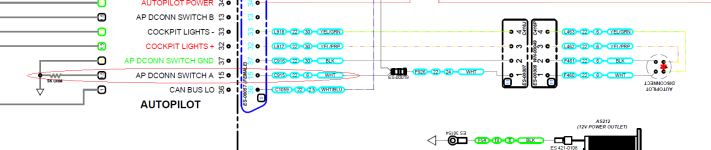
I will go into more detail when I get into work tomorrow and have access to all my info, but the story here is that Van's runs the AP disconnect wire into the AV60000 power module and ties it into a resistor, which has. o function whatsoever. When the servo hardware changed this created this issue. New harnesses have this wire removed. All you need to do to fix this is to snip this wire. When I have access to my notes / drawings tomorrow I'll tell you which one.I have a RV-12 with a G3X system finish in 2017 that’s before the RV-12iS series aircraft. The RV-12 wire bundle is different than the RV-12IS. Presently I’m trying to replace the autopilot servos to comply with the Garmin service bulletin and discovered the new servos will not work in my aircraft.
The new servos report that they have an active autopilot disconnect command and can’t be activated even when those pins are removed from the connectors. I have used the old servos for over 300 hour and had a power supply fail in the pitch servo and trying to replace the servos. Garmin say my wiring must be wrong. However, it has worked with the old servo for a long time.
My question is has anyone installed the new G3X servos using the old pre- RV-12iS. Wire bundle?
EDIT: I was able to download the drawing from Van's website. You need to remove pin 15 on the 37 pin female connector of harness WH-00101 that is connected to the AV-50000A to solve this issue. This harness is the autopilot harness that connects to the GMC and AP disconnect switch. This wire should be removed at the connecor or it could break the AP disconnect circuit for the switch.
Attachments
Last edited:
backcountry
Well Known Member
You are correct is the answer.I will go into more detail when I get into work tomorrow and have access to all my info, but the story here is that Van's runs the AP disconnect wire into the AV60000 power module and ties it into a resistor, which has. o function whatsoever. When the servo hardware changed this created this issue. New harnesses have this wire removed. All you need to do to fix this is to snip this wire. When I have access to my notes / drawings tomorrow I'll tell you which one.
EDIT: I was able to download the drawing from Van's website. You need to remove pin 15 on the 37 pin female connector of harness WH-00101 that is connected to the AV-50000A to solve this issue. This harness is the autopilot harness that connects to the GMC and AP disconnect switch. This wire should be removed at the connecor or it could break the AP disconnect circuit for the switch.
Now all that left is changing out the roll servo which is almost impossible. I’ve done it before and for me it’s a two day and takin breaks. The biggest issue is the two bottom mounting hole. anyone with good ideas would be appreciated.
The pitch was not too bad.
