Van's Air Force

The definitive Van's Aircraft support community! Buying, building or flying an RV? Join our exclusive family of mentors and enthusiasts!

GTR200B Radio Issue (Display)

HEB1022

Member
I encountered an issue with the GTR200 today during a flight that I have never seen before. Near the end of my flight, the display flashed between bright and dim every few seconds. I could not detect any pattern, other than it would flash bright and then go dim. Best I could determine, I did npt lose radio contact while this was happening and the issue seemed to be isolated to the display. The later portions of the flight was bumpy, so I thought maybe something vibrated or shook loose. Has anyone encountered this and found the issue? Any ideas how to troubleshoot it?

Thanks, in advance,

Harry
 
Do you have an external dimming circuit for the radio or is it relying on the built in photocell to control the display brightness? The answer to that question will direct where to look next.
 
Does it appear to look like the sensor on the front of the panel is changing it from day to night cockpit lighting??? Might try to cover it and see if conditions stabilized.
 
This happened to me several years ago. In my case, I also lost the ability to receive - transmissions ok. I removed the radio from the tray, applied a little dielectric grease to the connector pins and reset it. No issues since. I added this to my annual CI checklist and also now carry the hex wrench in the plane to remove it. Naturally I’ve not needed it since,
 
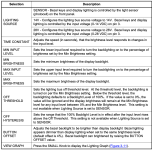
Thanks for the input. Based on the wiring diagram, it appears the light source is controlled by a manual dimmer switch. I understand, I could override this to use the photocell, but before I do that, I want to try to debug the lighting bus. I plan to follow Bob's suggestion of dielectric grease. I would also like to check all of the parameters in the configuration setup. Does anyone have their parameters (see below) that I can plazerize? My plane was factory built, and I can't find this information from Van's website.

TIA..
Harry
 

Attachments

  • Screenshot 2026-02-06 at 6.34.18 PM.png
    Screenshot 2026-02-06 at 6.34.18 PM.png
    221.4 KB · Views: 15
You might check the connector on the mounting shelf. Mine wouldn’t engage fully to the radio. If you’re RV12 is like mine I had to remove the transponder and it’s mounting rack which is above the GTR 200 B and from there you can see the connector with the Comm unit installed. From this location, you can reach down to the connector itself and push it towards the radio. If it’s like mine, the connector will then engage the radio further.
If this is the case like mine, I had to shim between the two tabs of the end plate of the mounting rack slots. This got the connector fully engaged to the radio. For a shim I used a rather long zip tie and install it between the two tabs and each sides of the shelf. You’ll see what I mean if you’re looking at it. You shouldn’t have to disassemble anything with the radio or shelf. If you download the Garmin installation manual you can see the end plate tabs and the slots in the sides of the mounting rack. This connector caused lots of problems for me.
Good Luck
The new GTR 205 Garmin designed a new mounting rack. I’d imagine they fix that problem.
 
Back
Top