Van's Air Force

The definitive Van's Aircraft support community! Buying, building or flying an RV? Join our exclusive family of mentors and enthusiasts!

Disable Canopy Lock Annunciation

rpigeek

Active Member
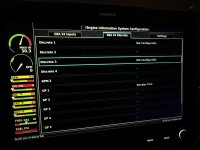
I have an E-LSA RV12 with a G3X Touch that I just purchased. I updated the software, and accidentally deleted the config, and I’ve been going back through and fixing things mis-configured. One of those is the Canopy Lock Annunciation. This is configured in the G3X and is always showing, I assume, because low/open is canopy open. However, I don’t have a canopy installed. I’m trying to figure out which discrete input I need to remove the configuration for to not have this annunciator to continuously show. Maybe, I’ll add a switch later, but it’s not a high priority as I’ve never had an issue in an RV7 without this switch.
 
If its E-LSA, it should have the wiring harness for the switch.
Just short the wires for the switch; make a spade jumper from a bit of aluminum.
 
See chapter 30.4.32.26 of the installation guide for the G3X Touch.

Config Mode; Engine & Airframe; GEA 24 Inputs; Find the one labeled "Canopy Closed" -- edit as necessary.
 
I’ll be looking more closely this weekend to see what wiring it uses. Was originally D180 and I’m not sure they used the Vans G3X bits. Nothing says canopy closed.
 

Attachments

  • IMG_2356.jpeg
    IMG_2356.jpeg
    695.5 KB · Views: 13
For this input, Van's uses a custom OEM configuration file so they can get their own alert behavior. If you want to clear out the special configuration for this input, what you want to do is hilight it as you've done, then press Menu and select "Delete Input Configuration".

If later you do want to connect a canopy-open switch, you can either reload the Van's config file, or you can just use the built-in "Canopy Closed" discrete configuration which is not substantially different.
 
Back
Top