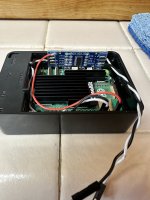
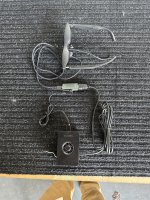
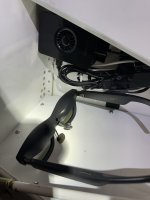
TRON

Well Known Member
Patron
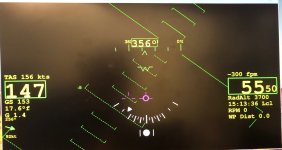
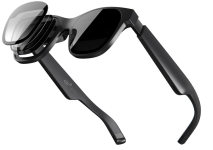
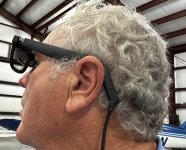
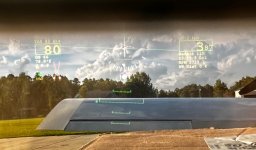
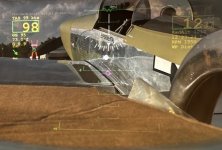
With some help from Joe Campbell we have finally found AR (Augmented Reality) Glasses that actually work in a light aircraft. After my years in F35 Flight Test including personally testing the F35 HMD in our CATB flying test bed I have been obsessed with bringing this capability in some form to the Experimental Aircraft world. Its my belief a working Gen-1 HMD system is finally here. Of course it wasn't designed for aircraft use but here we are. These are true high quality AR glasses that connect directly into our Raspberry Pi 5 HUD computer providing HDMI video and displaying a very usable aircraft HUD picture. We recommend using the XReal Air 2 PRO glasses (others may work but haven’t tested them), they weigh about 3 ounces, they fit great under my LightSpeed headset, and project a clear bright HUD display in front of my eyes while allowing a full outside world and inside cockpit view through the HUD image. I’ve updated our “FlyOnSpeed.org/hud” web page with additional information on these AR Glasses including a shopping list to order them, how to download and install our free HUD software on a Raspberry Pi 5 microcomputer, and other information and pictures on our overall HUD project. These Smart Glasses are in the middle of the AR Glass cost range at about $500 complete. We currently don’t have head tracking but we believe we have a path to add a cheap but reliable head tracking solution. But these HMD (Head Mounted Display – also called Helmet Mounted Display) glasses work awesome as is. The attached below HUD display picture taken through the glass display was very difficult to get but does show roughly what you can see. The HMD image is focused at about 12 feet. Not perfect but close enough that you don’t really notice any focus difference unless you think about it. Also there are prescription lens inserts (including Bi-Focal) available for these Glasses (see the shopping list on the web site) if needed.

The glasses are powered by a small USB-C connector (power and video) that fits tight against your head so the Headset can fit easily over it. These glasses have 3-levels of Electrochromic Dimming (electronic) dimming, adjustable screen brightness and other control functions on the ear frame. Our HUD graphics software provides a clear, bright, easily read image even with the electronic dimming turned totally off on a sunny day. No Wi-Fi is required for connection to the display and it doesn’t have any bulky batteries. The system just boots up and runs our HUD software display at power on. Head tracking if it works as we think it should will use a micro video camera mounted on/under the aircraft dash aimed back at the pilots face which will track your left/right/up/down head movements. Again no Wi-Fi issues. The only WI-Fi connection we use is sharing the aircraft ADSB data which is processed by the Raspberry Pi for traffic and target (GunFight Mode) display.

We will also soon integrate our OnSpeed M5 AOA display into the Raspebrry Pi 5, but the software can currently display the G3X, Dynon, and MGL AOA graphics. The new Raspberry Pi 5 processor has lots of extra power which has upped our FPS (frames per second) display rate to over 30 FPS. These AR glasses have many additional display capabilities but we are only focused on aircraft use as a HMD.

The FlyOnSpeed HUD software is programmed (Python 3) for a Raspberry Pi5 Micro-CPU and currently supports serial EFIS data from Garmin G3x, Dynon Skyview & D100, MGL, and recently added (but not fully tested yet) GRT Grand Rapids. We also simultaneously support Aircraft & ADSB data via WI-FI from Stratux, iLevil BOM, iLevil 3, uAvionix Echo/PING UAT, Dual XGPS190, and Dynon ADSB Wi-Fi. And can use an Analog to Digital interface for 150 mv analog Nav Needle inputs. The system being processed used is selected through the Software configuration file.

Cecil "TRON" Jones
Built RV8 Flying
Built RV6 with Son Chris-Flying
Sling 4 TSI Under Construction
Member FlyOnSpeed Team
15 Years F35 Avionics/CATB Flight Test
USAF Retired
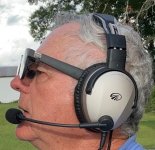
AR_Glasses_Side_WithHeadset.jpgAR_Glasses_Side.jpg

AR_HUD_Image1.jpgAR_HUD_Image2.jpgIMG_9533.jpgXReal_Pro_1.png
 
Last edited:
Super exciting. I've been watching TronView and interested in doing a HUD for a while, but couldn't figure out how to make the Epic Optix fit in a -9. I have a Raspberry Pi 5 already hooked up to my G3X feed to do higher rate data logging, so I'll probably be picking up a pair of the glasses soon.
 
Excellent. This is what I have been waiting for ever since I saw an article in 2011 about a guy (William J Steel) trying to project HUD info on the back of your prop using a laser.
Anyway of seeing a demo at OSH?
 
Will these fit over your regular glasses, or can they be purchased with prescription lenses?
 
Will these fit over your regular glasses, or can they be purchased with prescription lenses?
" Also there are prescription lens inserts (including Bi-Focal) available for these Glasses (see the shopping list on the web site) if needed."
 
Excellent. This is what I have been waiting for ever since I saw an article in 2011 about a guy (William J Steel) trying to project HUD info on the back of your prop using a laser.
Anyway of seeing a demo at OSH?
I do plan on making it to Oshkosh but likely Friday through Sunday. I'll try to set up a demo at the Sling Aircraft display tent (behind the LIFETIME MEMBER OASIS in the homebuilt aircraft area) lets say Saturday at 10AM? I have a Raspberry Pi with some recorded inflight files that I can playback into the AR Glasses. I just gave a demo today at our local EAA meeting and there were lots of This is really Cool and just Awesome remarks!!
 
This is great to see. Seems like it was yesterday but in fact it was several years ago that GRT Avionics came up with the same capability, albeit with much older, clunkier "smart glasses".
 
Really cool.
I wish I was able make OSH this year.
I like these glasses. A big improvement and prescription lens too!
 
" Also there are prescription lens inserts (including Bi-Focal) available for these Glasses (see the shopping list on the web site) if needed."
Missed that, thanks.

Hmm... Seems it's only available in the US. The Canadian site makes no mention of prescription lens partners.

Lenses in the US are $209US. I didn't go through to see if it's more for progressive.
 
Missed that, thanks.

Hmm... Seems it's only available in the US. The Canadian site makes no mention of prescription lens partners.

Lenses in the US are $209US. I didn't go through to see if it's more for progressive.
Basic prescription lens are $60 at this site: https://honsvr.com/product/custom-xreal-air-2-air-2-pro-prescription-lenses-by-honsvr/
The Bifocal glasses are only available currently from one company in Australia and do cost a good bit more.
 
Last edited:
Basic prescription lens are $60 at this site: https://honsvr.com/product/custom-xreal-air-2-air-2-pro-prescription-lenses-by-honsvr/
The Bifocal glasses are only available currently from one company in Australia and do cost a good bit more.
Optix 20/20 stick-on bifocals might be a good inexpensive option. Used them for decades on my Serengeti's for flying. Can adjust "segment height" at application to adapt to my asymmetrical orbit bones. Easy on/off and reusable.
 
For head tracking, would it be possible to flip things around and use the higher-end XREAL glasses that have cameras built in + fiducial stickers in the cockpit?
 
For head tracking, would it be possible to flip things around and use the higher-end XREAL glasses that have cameras built in + fiducial stickers in the cockpit?
It might be possible but I don’t think it would be very easy? I have looked hard at these higher end glasses and the interface software development kit they have is android based and doesn’t seem easily usable for our current python RasPi5 based software. These glasses try to provide a self contained 6 DOF AR in the glasses tracked head orientation system. Which to me seems that you would have to track the glasses position in space through the full pitch roll yaw of the aircraft (already being tracked by the aircraft attitude system) and also the pilots head movement delta from bore sight from the aircraft orientation plus any wiggle of the pilots seat. This gets into the software inertial sensor nightmare the F35 HMD has to work through. If these glasses could simply self track the inside of the aircraft pilot head movements from a bore sight point and disregard the outside world aircraft movement then that might be doable. I would call that the Gen2 Experimental Aircraft HMD. Right now I’m exploring a cockpit camera based head tracking, a lot simpler system that bypasses most of the challenges of a glasses based head tracker.
If we get enough smart folks jumping in to help explore this technology and help with its development then most anything is possible!!

1 Dec24 Update, we have had some smart folks show its possible using new XReal software development tools to make these glasses work with our HUD software and right now MS FLight Simulator, so we have seriously started investigating how to use the XReal air 2 pro ultra smart AR glasses (with a built in IMU and positioning camera) with out HUD software for aircraft use. Will provide updates as we move along!!
 
Last edited:
Augmented Reality HUD Glasses Software and Instructions Update

Our group has been working on our HUD/HMD software plus our Demo and Install instructions over the summer so I wanted to provide some updates as follows;

1) Improvements have been made to the G3s data parser.
2) G3x systems with Radar altimeter will see the AGL Radar Altitude in the HUD and HMD/AR Glasses display when below 500 feet.
3) The HUD graphics have been optimized for the 1920 x 1080 AR Glasses pixel resolution. This has also fixed the boot up issues with the LORYI HDMI to USB-C Video and power cable, as shown in the HUD shopping list in our FlyOnSpeed web site -->FlyOnSpeed/HUD web site
4) The new FlyOnSpeed AOA Graphics display AOA profile has been added to the HUD display, details are in the updated instructions (if your aircraft has an AOA system)
5) The expanded download and set up instructions (some 17 pages) and 6 Sept24 software can be found at my Google Drive Link below
---- a) How to download and use this Raspberry pi5 SD Memory Card (pdf) (instructions)
---- b) RasPi5_G3x_6Sept24_ARGlass_Update.zip (Raspberry Pi 5 Software Update)
---- c) Web Link --> Google Drive Web Link (Both instructions and software can be found at this web link)
6) Software can currently integrate with serial data from MGL, Garmin G3x, Dynon Skyview & D100, and GRT, and using wifi Stratux, iLevil BOM, iLevil 3, uAvionix Echo UAT, Dual XGPS190, Dynon ADSB wifi. It can process both EFIS serial and ADSB-WIFI data at the same time.
Note: The Demo software can support all these systems with a config file change as outlined in the instructions.

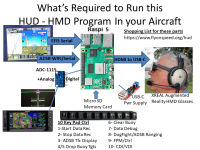
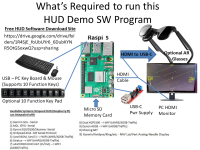
I have added some new graphics charts below outlining what is required for a basic HUD software demo using included playback of recorded flight data, and also what additional requirements are needed to add the complete system to your aircraft.
 

Attachments

  • XReal_Details.png
    XReal_Details.png
    574.8 KB · Views: 58
  • XReal_Demo_Details.png
    XReal_Demo_Details.png
    437.9 KB · Views: 58
Last edited:
Augmented Reality HUD Glasses Software and Instructions Update

Our group has been working on our HUD/HMD software plus our Demo and Install instructions over the summer so I wanted to provide some updates as follows;

1) Improvements have been made to the G3s data parser.
2) G3x systems with Radar altimeter will see the AGL Radar Altitude in the HUD and HMD/AR Glasses display when below 500 feet.
3) The HUD graphics have been optimized for the 1920 x 1080 AR Glasses pixel resolution. This has also fixed the boot up issues with the LORYI HDMI to USB-C Video and power cable, as shown in the HUD shopping list in our FlyOnSpeed web site -->FlyOnSpeed/HUD web site
4) The new FlyOnSpeed AOA Graphics display AOA profile has been added to the HUD display, details are in the updated instructions (if your aircraft has an AOA system)
5) The expanded download and set up instructions (some 17 pages) and 6 Sept24 software can be found at my Google Drive Link below
---- a) How to download and use this Raspberry pi5 SD Memory Card (pdf) (instructions)
---- b) RasPi5_G3x_6Sept24_ARGlass_Update.zip (Raspberry Pi 5 Software Update)
---- c) Web Link --> Google Drive Web Link (Both instructions and software can be found at this web link)
6) Software can currently integrate with serial data from MGL, Garmin G3x, Dynon Skyview & D100, and GRT, and using wifi Stratux, iLevil BOM, iLevil 3, uAvionix Echo UAT, Dual XGPS190, Dynon ADSB wifi. It can process both EFIS serial and ADSB-WIFI data at the same time.
Note: The Demo software can support all these systems with a config file change as outlined in the instructions.

I have added some new graphics charts below outlining what is required for a basic HUD software demo using included playback of recorded flight data, and also what additional requirements are needed to add the complete system to your aircraft.
I have mine working in my -8 with an MGL iEFIS. Pretty cool. Fairly easy project if you follow the directions carefully. Make sure to start with the link above from Sept 10. It’s a one wire interface to the EFIS. It took me 8 hours or so to load the software and understand the operation. Another few hours to wire the hardware and 5 hours to put it in the plane. I just mounted the hardware with Velcro under the armrest while I figure out the operation and make some changes. The whole thing weighs about 6 ounces. It draws about 0.7 amps total.

Even without the head tracker it’s awesome. With me and my plane the waterline is right on the horizon. The glasses stay in place +4/-1 G and seal well to the ear cups. You can see the display even flying into the sun. The optics aren’t perfect, there is a little more glare from the back side of the lenses than regular sunglasses.

A side benefit is with an extension cable you can give the glasses a pilot in the back seat of a -8 and they have all the information to fly the plane.

Thanks Cecil!
Mike
 

Attachments

  • IMG_1084.jpeg
    IMG_1084.jpeg
    1.5 MB · Views: 84
  • IMG_1087.jpeg
    IMG_1087.jpeg
    3.4 MB · Views: 79
  • IMG_1091.jpeg
    IMG_1091.jpeg
    822.6 KB · Views: 72
  • IMG_1093.jpeg
    IMG_1093.jpeg
    1.4 MB · Views: 79
Last edited:
Oshkosh AR Glasses & HUD Forum Next Week

Focus on how our HUD software & AR Glasses can be set up and used in your cockpit.

Monday at 10:00 -11:15 & Friday 11:30 - 12:45 in the Homebuilt Hangar

We also have 4 working HUD & AR Glasses display systems at our FlyOnSpeed AOA booth also in the same Homebuilt Hangar building. We have a head tracker system and some 3D beta software to track and display ADSB traffic. Come try it out.