Notso

Well Known Member
Patron
I wasn't sure which forum was the best, so went with General. I thought I'd share my camera mount idea for mounting a 360 or Go pro camera up on the top of the Vertical stab. This is an RV-8, but should work on any RV model.

The background for doing this was because I'm participating in and teaching a lot of formation flying sessions. I wanted to use it as a debrief tool, as well as just cool pics/videos of flying. I tried mounting the camera in several places - On the top of the wingtip, under the wing mounted to the tiedown mount, mounted behind the rear seat inside of the canopy, etc. But none of them really worked well as the view was always not ideal. So I've been wanting to mount it to the top of the VS as I think this has the best unobstructed view all around for formation video. But all the existing mounting solution scared me - like the go pro stick on mounts. I didn't want to lose a $600 camera in flight... So I was racking my brain to come up with a solution that I could mount it to the structure without it being too obtrusive or obvious. So with the help of some friends, here's what we came up with:

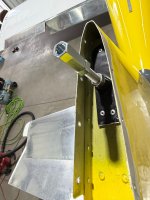
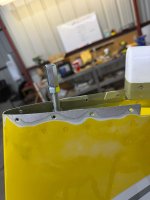
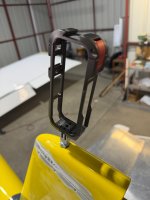
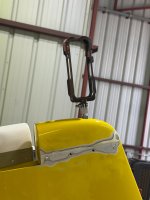
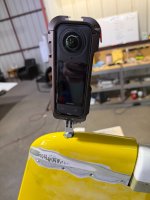
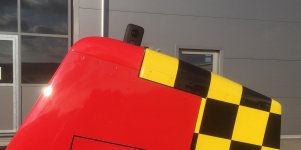
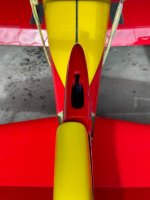
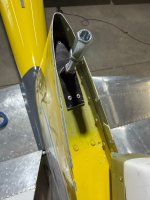
After removing the top fiberglass fairing on top of the VS, I took one of the Planearound LLC mounts, cut it down in length and pop riveted it to the top rib in the vert stab. I then added a 3" threaded stud with a coupler that would then allow a 3/8-16 inch tie down go pro mount to screw into the top. I played with the length of the coupler to have it sit just flush underneath the bottom of the fairing.

I'm going to do the first flight on Monday to see how it looks.

The next step is getting power and audio to it. I don't really HAVE to do this and may fly with it like this for a while. Because currently, I can connect the camera via Bluetooth to the Garmin Audio panel to record intercom and radio comms and the battery has like a 4 hour life. But it would be nice to be able to control the camera from the cockpit with an ON/OFF switch.
 

Attachments

  • IMG_0191.JPG
    IMG_0191.JPG
    1.1 MB · Views: 224
  • IMG_0192.JPG
    IMG_0192.JPG
    1.2 MB · Views: 214
  • IMG_0193.JPG
    IMG_0193.JPG
    1.6 MB · Views: 183
  • IMG_0194.JPG
    IMG_0194.JPG
    1.5 MB · Views: 177
  • IMG_0195.JPG
    IMG_0195.JPG
    1.1 MB · Views: 172
  • IMG_0200.JPG
    IMG_0200.JPG
    1.5 MB · Views: 219
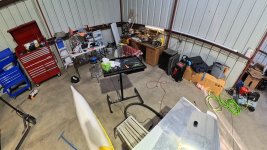
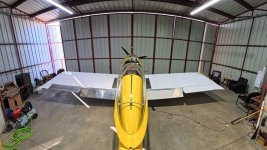
This is the view I'll get from the 360 cam, so it should really look goof for formation work
 

Attachments

  • Hangar 260 Tail2.jpg
    Hangar 260 Tail2.jpg
    371 KB · Views: 96
  • Hangar 360 tail1.jpg
    Hangar 360 tail1.jpg
    329.8 KB · Views: 97
I'm very interested in your experiences with this mount.

I saw a similar mount, but much lower, which of course required a larger cutout on the VS fairing. I think it was @Dan 57 who did this. I have an Osmo 360 inside the cockpit, but the videos produced are not that great, mainly due to the canopy and distortion. It does get excellent shots of my GIB and the back of my neck, so there's that.

In this video, you can move the image around by clicking and dragging your mouse, or use the controls at the top left corner - no idea how to zoom in or out.

 
RV-8 VS, fairing install. Insta 2, which is quite narrower than following models. Fixed power supply (14-5V) between R&L HS. Worked pretty good. Commands from the panel installed iPad ok via BT.
Results in my signature links.

IMG_8740.JPGIMG_8749.JPGIMG_9031.jpg
 
Notso,

Reference your comment, “But it would be nice to be able to control the camera from the cockpit with an ON/OFF switch.”

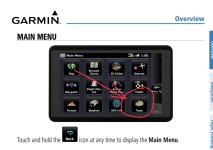
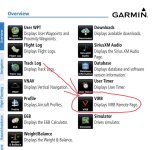
I use both a Garmin VIRB Ultra on a rear mount inside the cockpit on the turtledeck just behind the back seat of my -8 that is connected to a cable that plugs into the rear headphone audio jack and a Garmin VIRB 360 on the front glare shield that records audio via Bluetooth to my Garmin GMA 245 BT audio panel. Both cameras have the capability to be turned on and off via the Garmin Aera 660 GPS menu, see below. You can remotely start recording, stop recording, and take pictures on your VIRB camera using the VIRB Remote menu on a compatible Garmin device. Both cameras use the same mount so either can be used in the front or back.

You just have to REMEMBER to turn power ON to the camera before you strap in then you start/stop recording from the cockpit
 

Attachments

  • IMG_2940.jpeg
    IMG_2940.jpeg
    92.6 KB · Views: 19
  • IMG_2941.jpeg
    IMG_2941.jpeg
    166.7 KB · Views: 19
I'm very interested in your experiences with this mount.

I saw a similar mount, but much lower, which of course required a larger cutout on the VS fairing. I think it was @Dan 57 who did this. I have an Osmo 360 inside the cockpit, but the videos produced are not that great, mainly due to the canopy and distortion. It does get excellent shots of my GIB and the back of my neck, so there's that.

In this video, you can move the image around by clicking and dragging your mouse, or use the controls at the top left corner - no idea how to zoom in or out.

Yep, I tried my 360 camera inside on the canopy crossbar. Its a decent vantage spot, but as you said, the canopy reflections and distortion detracted from it. I'm getting ready to head to the airport to try it out. I had a 4-ship I was going to lead this afternoon, but it all fell apart. So going single ship this time.
 
RV-8 VS, fairing install. Insta 2, which is quite narrower than following models. Fixed power supply (14-5V) between R&L HS. Worked pretty good. Commands from the panel installed iPad ok via BT.
Results in my signature links.

View attachment 114995View attachment 114996View attachment 114997
Very nice. Is the camera actually recessed into the fairing??

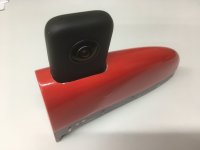
I have the Insta x5, so quite a bit thicker. I went with the cage mount for better security of the camera as well as easier access to get it on and off. You just open the cage door at the top and pull the camera out. No unscrewing on and off everytime.
 
Notso,

Reference your comment, “But it would be nice to be able to control the camera from the cockpit with an ON/OFF switch.”

I use both a Garmin VIRB Ultra on a rear mount inside the cockpit on the turtledeck just behind the back seat of my -8 that is connected to a cable that plugs into the rear headphone audio jack and a Garmin VIRB 360 on the front glare shield that records audio via Bluetooth to my Garmin GMA 245 BT audio panel. Both cameras have the capability to be turned on and off via the Garmin Aera 660 GPS menu, see below. You can remotely start recording, stop recording, and take pictures on your VIRB camera using the VIRB Remote menu on a compatible Garmin device. Both cameras use the same mount so either can be used in the front or back.

You just have to REMEMBER to turn power ON to the camera before you strap in then you start/stop recording from the cockpit
I do have a power ON and recoding ON/OFF option using my iphone via the Insta360 App. There just is no power OFF ability. The good news is the x5 has a really good battery life of 3+ hrs, so I can just turn it on when I want and leave it on until I land.
 
Is the camera actually recessed into the fairing??

Indeed.
Thing is I used to secure it by way of a side pin sliding thru the fairings an VS flanges, but found out that having the hole shaped to "close" tolerance that it was not necessary. So later use was just by way o connecting the power (angled USB adapter on the camera= keyway in the cutout), and sliding it in... never lost it 😉

You just have to REMEMBER to turn power ON to the camera before you strap in then you start/stop recording from the cockpit

Yep, very good remark. The more so when using multiple cameras... the logistics are bigger than anticipated on longer trips, and the processing and editing very time consuming.
@SuperCubDriver being an expert in this field 👏🏻
 
I'm very interested in your experiences with this mount.

I saw a similar mount, but much lower, which of course required a larger cutout on the VS fairing. I think it was @Dan 57 who did this. I have an Osmo 360 inside the cockpit, but the videos produced are not that great, mainly due to the canopy and distortion. It does get excellent shots of my GIB and the back of my neck, so there's that.

In this video, you can move the image around by clicking and dragging your mouse, or use the controls at the top left corner - no idea how to zoom in or out.

I've been flying with the camera on pretty much every flight now and the top of the VS is by far the best vantage point for good clear video. The mount is rock solid so far. I removed the fairing just last week to check on how everything is looking and all the parts were still plenty tight. Out of an abundance of paranoia - I ended up adding Blue Locktite on all the threads.

Anyway, after trying several mounting locations - tie down screw in hole under the wing, top side of the wing tip and under the canopy - the top of the VS imho, gives the best unobstructed view. Especially for formation work.

Here's a couple of examples: